Price Adapt
Overview
Price Adapt is a profitability optimization engine in Braiins Manager. It dynamically evaluates each miner's net mining profitability and automatically applies the most profitable action available for that miner at the time.
Price Adapt bases these decisions on:
- Hashprice
- Energy price
- Miner efficiency
Price Adapt uses this profitability logic to pause mining when no profitable setting is available and automatically resume mining when economic conditions improve. With supported Braiins OS miners, it can also evaluate each miner model's efficiency curve and select the most profitable power target for each hour.
This dynamic power targeting is a large part of Price Adapt's value and requires the granular power control provided by Braiins OS firmware. For this reason, Price Adapt works best with supported miners running Braiins OS.
Price Adapt is currently under active development. The interface, supported capabilities, and recommended workflows may change as the feature improves.
How Price Adapt Works
Price Adapt evaluates profitability per hour and per miner using a Net Profit model:
For each hour, Price Adapt evaluates each miner model's efficiency curve against energy price and hashprice, computes each power setting's hourly Net Profit (its per-MWh margin multiplied by its power draw), and selects the setting with the highest hourly Net Profit. If no setting is profitable, the miner is curtailed (paused) for that hour.
Multiplying by power draw is what makes the decision price-aware: in cheap hours, higher power settings win even though they are less efficient per MWh; as the energy price rises, the optimum walks down the efficiency curve, and near breakeven the most efficient setting wins. Comparing the per-MWh margin alone would always favor the most efficient setting regardless of price.
Breakeven and Tolerance
Price Adapt estimates mining revenue from the 7-day average hashprice and miner efficiency. The breakeven energy price is the energy price where that estimated revenue exactly matches the miner's electricity cost:
Tolerance shifts the profitability threshold Price Adapt uses across both curtailment and power-target decisions. (Tolerance was previously labeled "Breakeven Energy Price Adder"; the sign convention is unchanged.)
- Positive Tolerance: biases Price Adapt to mine more aggressively -> curtails later (useful when you accept more mining exposure, e.g., expecting BTC appreciation).
- Negative Tolerance: biases Price Adapt to be more conservative -> curtails earlier (useful to account for additional site operating costs beyond miner power consumption). A practical example: if your site pays X USD/MWh of volumetric delivery charges (e.g., TDSP charges in ERCOT) on top of the energy price, set Tolerance to −X so all decisions reflect your all-in energy cost instead of the wholesale price alone.
Day-ahead scheduling
Price Adapt uses Day-Ahead Market (DAM) pricing. A daily planning cycle builds the next day's plan: for each hour, Price Adapt computes the most profitable power target for every supported miner model and schedules pauses, resumes, and power-target changes accordingly.
Device Support and Available Actions
The available actions Price Adapt can take depend on the miner's firmware and model:
- Supported Braiins OS miners: miners running Braiins OS whose model is supported by the physics-based efficiency model. Price Adapt can overclock, underclock, pause, or resume these miners to find the most profitable operating point each hour.
- Stock firmware and unsupported models: stock-firmware miners, or Braiins OS miners whose model is not yet supported. Price Adapt can pause and resume these miners based on profitability, but does not adjust their power target.
The Add/Edit Price Adapt Profile modal shows a Braiins OS / Stock FW breakdown of the targeted devices so you can see how many of your selected miners support power-target optimization.
Power-target optimization applies to supported miners running Braiins OS. Stock firmware devices can still use Price Adapt for automatic pause and resume actions based on profitability.
How Price Adapt Improves Mining Economics
Bitcoin mining economics are increasingly sensitive to both mining revenue and electricity price volatility. While hashprice may remain relatively stable, power markets can move sharply within a very short time. In markets such as ERCOT, scarcity events can push electricity prices to extreme levels, quickly erasing mining margins or turning mining unprofitable.
Price Adapt helps protect those margins by automatically aligning hashing runtime — and, for supported miners, power draw — with expected profitability. It uses Day-Ahead Market pricing together with miner efficiency and hashprice to identify hours when mining is no longer economically justified. When the expected power price rises above the profitability threshold, Price Adapt curtails mining or reduces power. When economics improve again, it resumes or increases power automatically.
This is especially valuable for fleets that include older-generation miners such as the Antminer S19j Pro, where profitable operating windows can be much narrower during high-price events. More efficient models, such as newer Antminer S21 units, can benefit as well, because intelligent curtailment and power-target tuning improve overall fleet efficiency and reduce exposure to the most expensive hours.
In internal analysis covering October 2024 to October 2025, Price Adapt was projected to improve profit by approximately $26,400 per MW for an Antminer S19j Pro in the analyzed scenario.
Price Adapt is not designed to maximize uptime at any cost. Its goal is to maximize economically justified uptime.
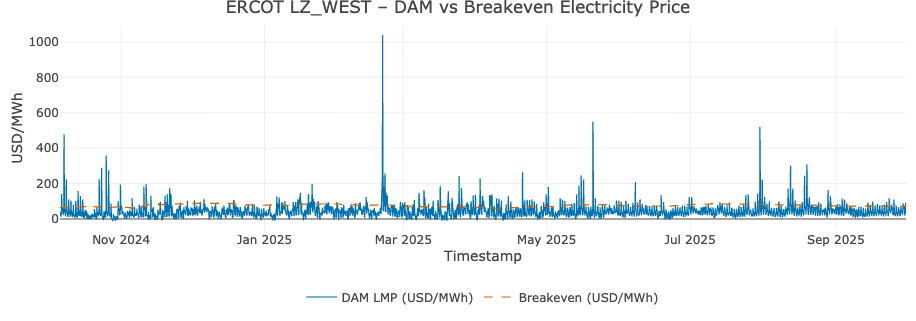
The graph below shows the energy price from October 2024 to October 2025. The blue line represents the ERCOT LZ_WEST day-ahead energy price, while the dashed red line indicates the breakeven energy price for an Antminer S19j Pro. Mining is unprofitable when the energy price is above the dashed red line.
Set Up Price Adapt
1. Connect Market Prices
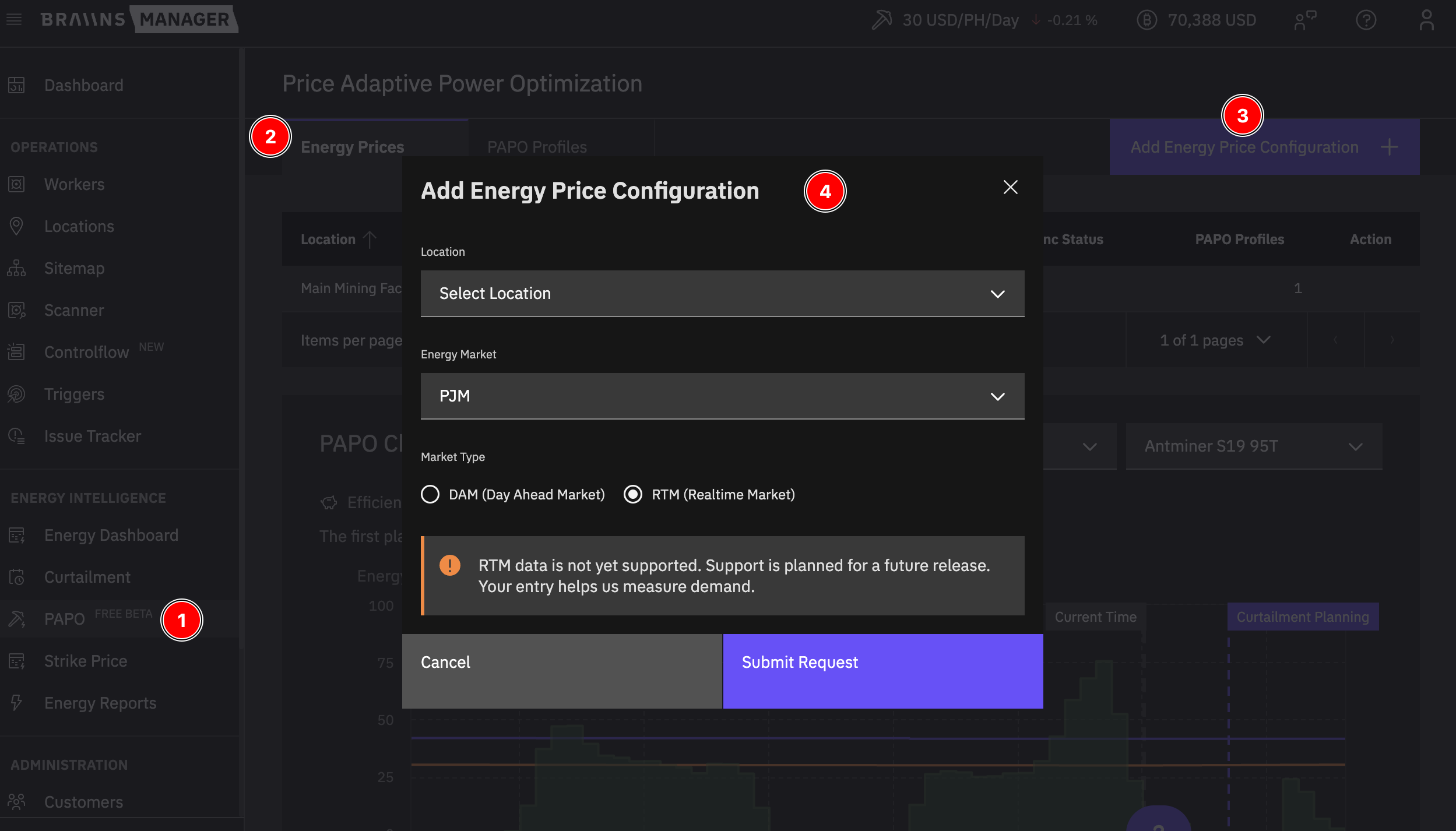
Price Adapt currently supports Day-Ahead Market prices for ERCOT and PJM. Follow these steps to connect market prices for each location before creating a Price Adapt profile:
-
Open Price Adapt in Braiins Manager.
-
Go to the Energy Prices tab.
-
Click Add Energy Price Configuration.
-
Select:
- Location
- Energy Market (ERCOT or PJM)
- Market Type (Day-Ahead)
- Region or pNode ID (based on market selection)
-
Set the Location Capacity [MW] if your site has a power cap. This field is pre-filled from the Location if it is already defined, and is saved back to the same Location record.
-
Save the configuration.
- One Energy Price configuration is allowed per location.
- If a location already has Market Prices configured in Strike Price Curtailment, the same configuration is automatically available in Price Adapt.
- Location Capacity is shared with the Location page — editing it in either place updates the same value. Price Adapt uses it as a hard cap on the total scheduled power draw for the site and applies changes from the next scheduling cycle.
- If you select an unsupported market or market type, the form switches to Submit Request mode so you can request support.
2. Create a Price Adapt Profile
- Open the Price Adapt Profiles tab.
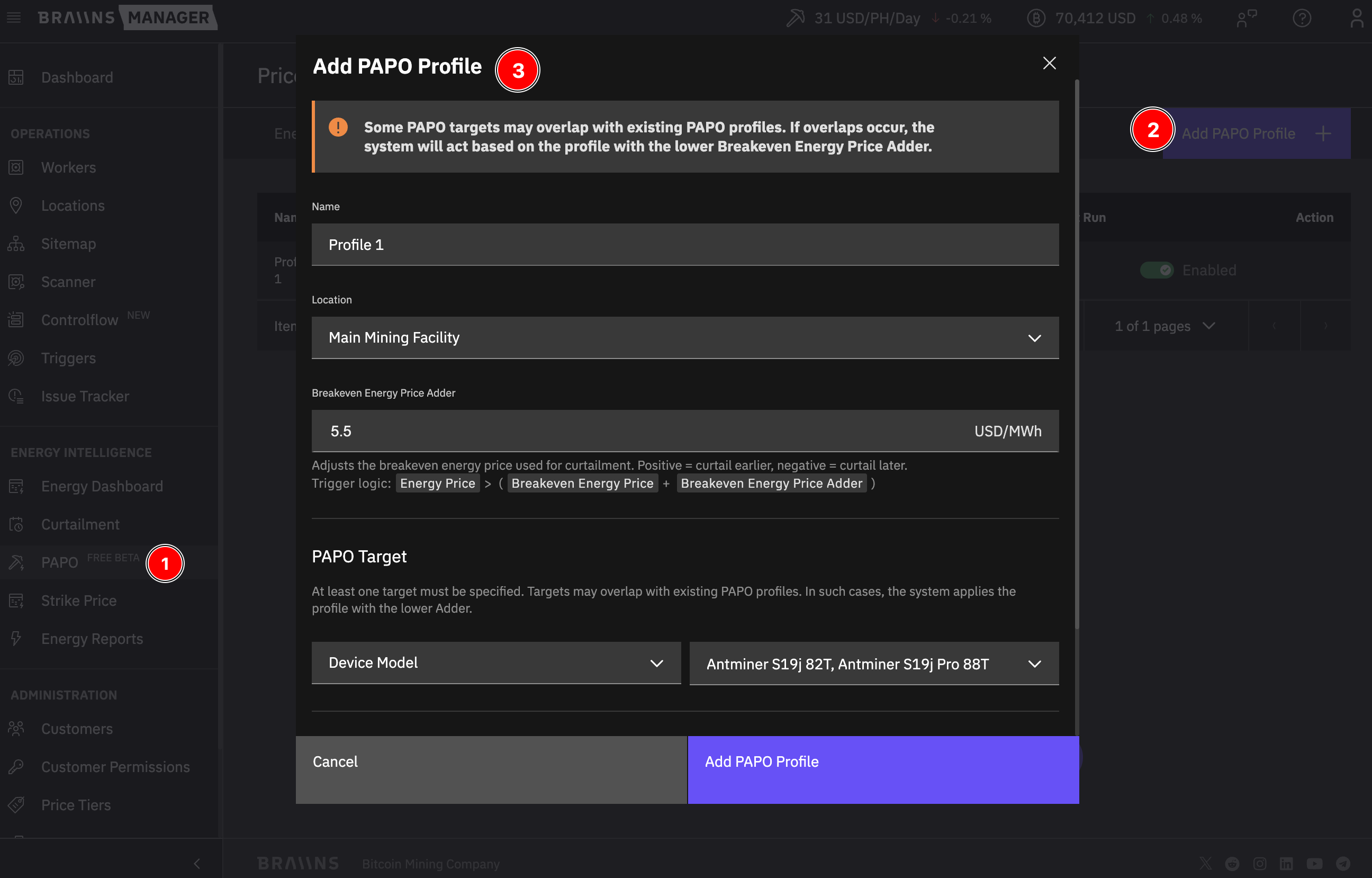
- Click Add Price Adapt Profile.
- Configure:
- Name
- Location
- Tolerance (USD/MWh)
- Price Adapt Targets (Customer, Device Models, IP Range, Group, Rack, Firmware Type)
- Review the Targeted Devices count and the Braiins OS / Stock FW breakdown shown next to it.
- Save and enable the profile.
- Profile names must be unique within the selected location.
- At least one target is required, and each target type can be used once per profile.
- When multiple profiles target the same device, the profile with the lower Tolerance (more conservative) applies.
- Profile changes affect the next planning cycle and do not retroactively change already planned/running curtailments.
3. Enable or Disable a Profile
- Use the profile toggle in the list view.
- Disabling a profile does not cancel already planned or currently running curtailments. Remove those manually in Curtailment if needed.
Price Adapt Chart
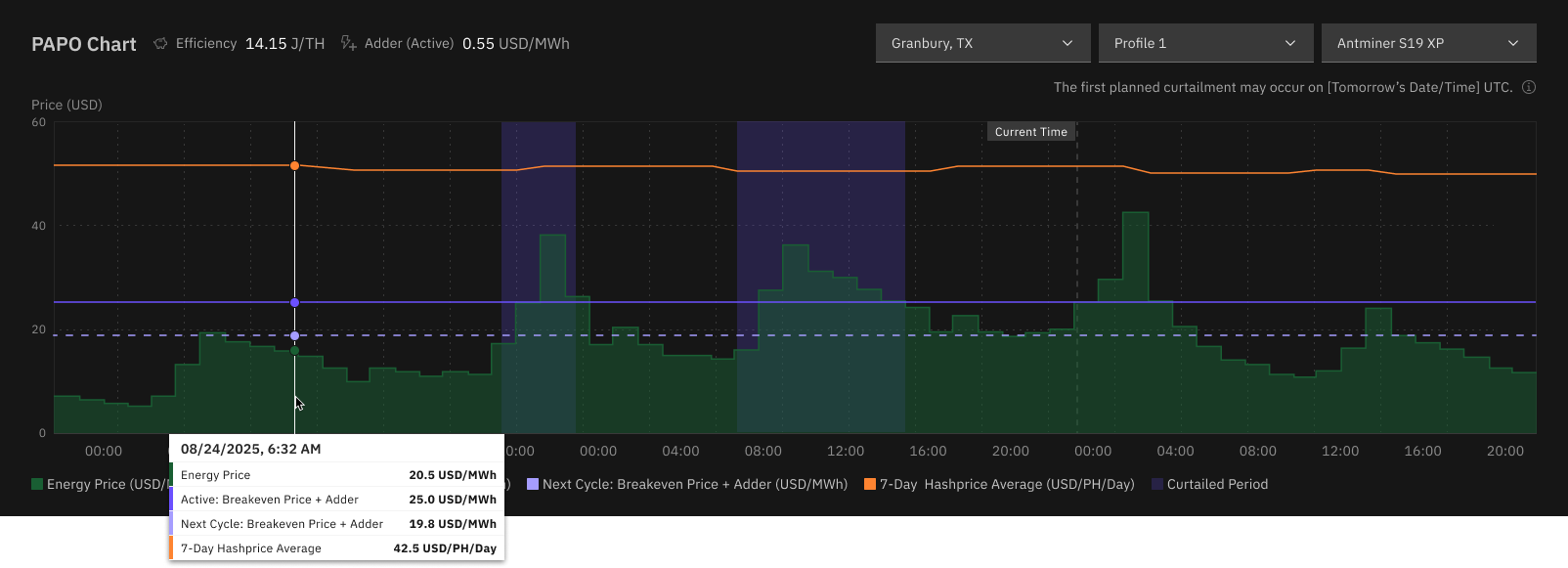
The Price Adapt chart helps you understand when and why curtailments happen.
Main series and markers:
- Energy Price (USD/MWh): The Day-Ahead Market electricity price used for evaluation.
- Active profit threshold: The currently active profitability threshold (breakeven adjusted by Tolerance).
- Next-cycle threshold: The threshold prepared for the upcoming planning cycle after recent profile changes.
- 7-Day Hashprice Average (USD/PH/Day): Smoothed hashprice input used in the profitability calculation.
- Curtailment periods: Time windows where the energy price is above the active threshold and Price Adapt plans pause actions.
- Curtailment planning marker: Vertical marker showing the next scheduler run that plans new curtailments.
Chart filters:
- Location
- Price Adapt Profile
- Miner Model
The curtailment chart shows curtailment events only — pause and resume decisions. Power-target adjustments (overclock/underclock) are not reflected here. To review power-target adjustments, see the Events History tab.
Upcoming Events and Skipping Hours
The Upcoming Events tab shows the next day's plan produced by the day-ahead scheduler — one row per scheduled future hour per profile, up to roughly 34 hours of lookahead.
Each row includes the date/time, location, energy market, region, market type, profile, hashprice, energy price, Tolerance, Estimated Impact, and Status:
- Estimated Impact summarizes the planned action counts for the hour — for example
↑13 ↓244 ⏸100 ▶12(overclock, underclock, pause, resume). Hover to see the labeled breakdown. Estimated Impact reflects the day-ahead plan and does not reconcile later runtime state changes. - Status is one of Scheduled, To Skip, or Ongoing (the currently running hour).
Skipping an hour
Use Skip Event on a future hour to stop Price Adapt from issuing any planned commands (pause, resume, or set power target) for that hour. Skipped miners simply stay in the state they were in at the end of the previous hour. Skipping an hour also deactivates the corresponding planned Curtailment entry so both surfaces stay consistent, and is recorded in Events History as "Skipped by user."
You can undo a skip with Resume Event any time before the hour begins. Once the hour is running or has passed, the action is hidden and the status can no longer be changed.
Skip is scoped to Price Adapt's own day-ahead plan. It does not cancel manual worker commands, Controlflow curtailments, or actions from other sources. Skipping is per-hour, per-profile — not per-miner.
Events History
The Events History tab is an audit log of realized scheduled hours — one row per realized hour per profile. Future hours are not shown here (use Upcoming Events for those).
Columns include date/time (in your account timezone), location, energy market, region, market type, profile, 7-day average hashprice, energy price, Tolerance, and Impact. Impact counts only the miners whose state changed relative to the previous realized hour, broken down into overclocked, underclocked, paused, and resumed; hover the cell to see the labeled counts.
Filters include Location and Price Adapt Profile (multi-select with search) and an Impact filter offering "With Affected Workers" and "Without Affected Workers." The table is sortable and paginated (20 rows by default, with 10 and 50 options).
Events History records are retained for 2 months. Older records are removed automatically by a daily cleanup job.
Monitoring and Logs
Price Adapt actions are visible across Braiins Manager:
- Worker Details -> Logs -> Executed Commands
Pause Mining,Resume Mining, andSet Power Target: X Wentries, each shown withExecuted by: Price Adapt.- Each entry records the time, the miner state after the command, the command text, the executor, and the response (success/failure).
- When a miner already matches the scheduled target, the redundant command is suppressed and no log entry is created for that hour.
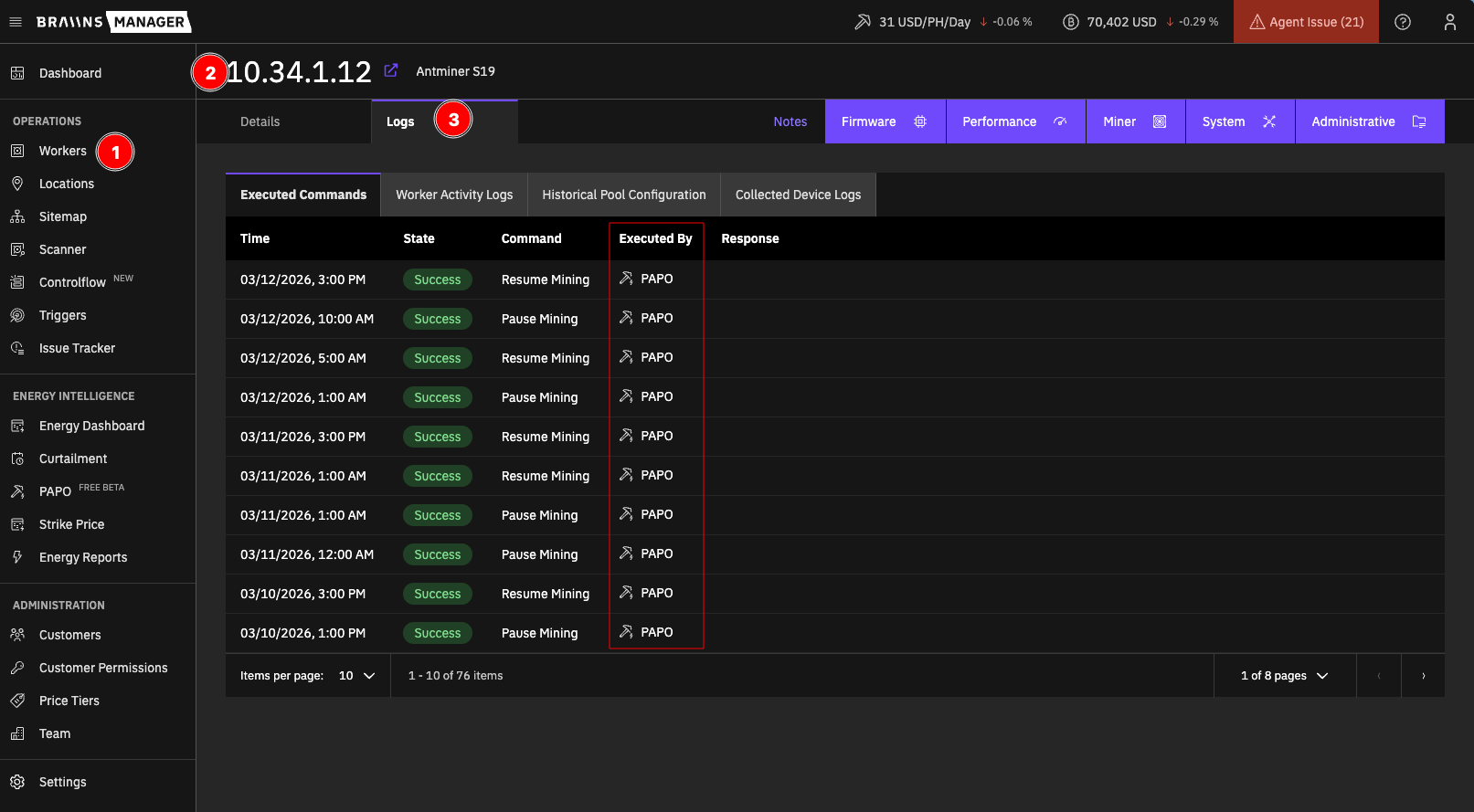
- Curtailment tables
- Price Adapt-triggered entries appear in the list, history, and next-runs tables.
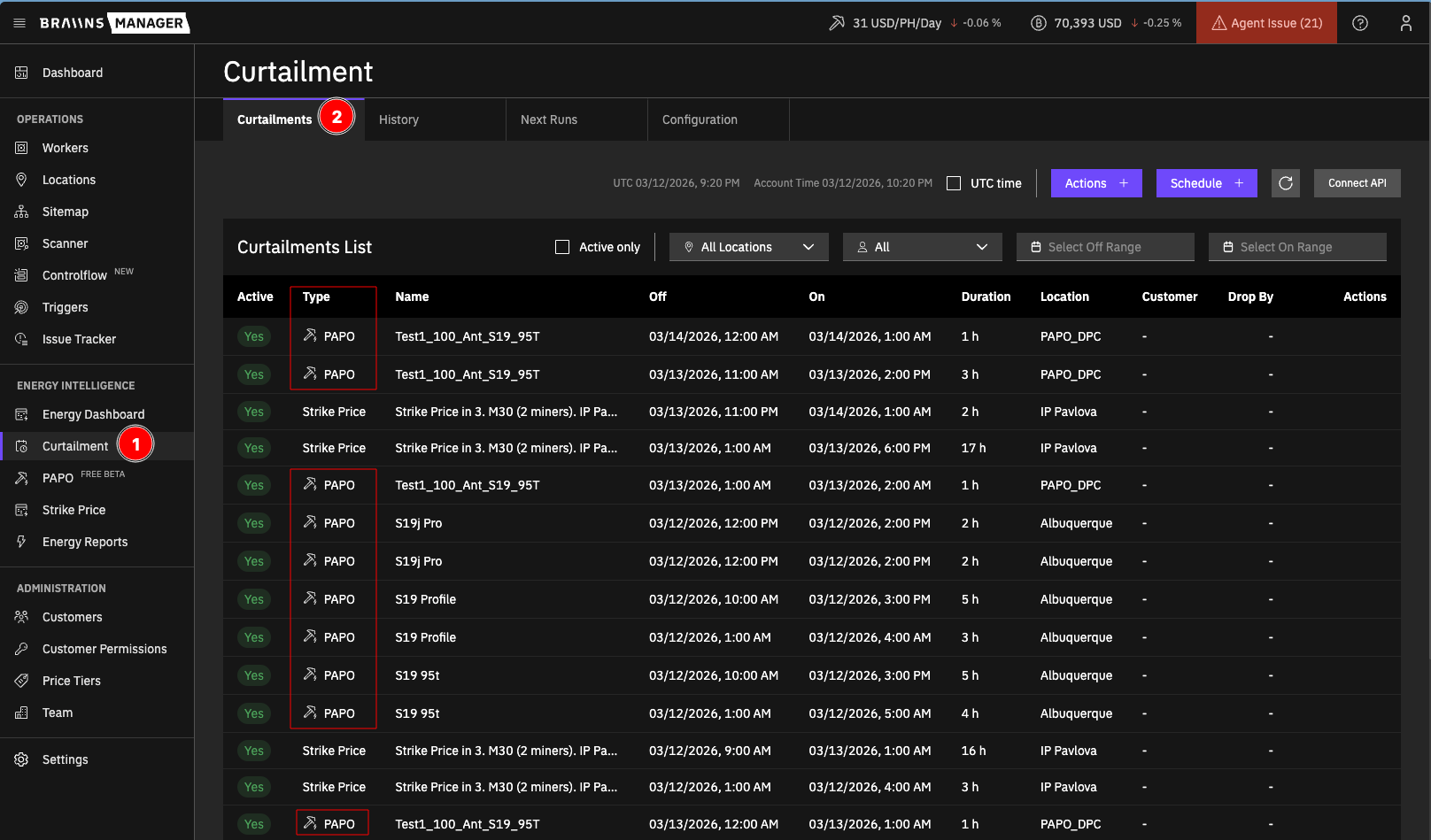
This gives full visibility into planned, running, and finished Price Adapt actions.
Notifications
You can receive Telegram alerts when a Price Adapt curtailment is scheduled, starts, or ends. Subscribe per user in Settings > Notifications, under Get Notified About, using the Price Adapt toggle. See Curtailment notifications for setup details and requirements.
Access and Permissions
Price Adapt visibility and usage depend on permissions:
- The Price Adapt page-access permission controls whether Price Adapt appears in navigation for sub-accounts.
- Users also need access to the relevant Locations to configure Energy Prices and Price Adapt Profiles, and to set Location Capacity.
- Viewing Curtailment tables, worker logs, and Events History follows your existing Curtailment and Workers access.
If Price Adapt is not visible, verify account-level page access and location permissions.
Best Practices and Limits
- Start with one location and a limited number of selected devices (via targets), and validate the behavior before scaling.
- Set an accurate Location Capacity so power-target optimization respects your site's real power limit.
- Review chart behavior and the Upcoming Events plan after each profile update.
- Remember that Price Adapt planning is forward-looking (next cycle), not retroactive.
- If required data (market prices or hashprice) is temporarily unavailable, planning may be deferred until data is available.
For operational help, see Troubleshooting and Support.