FAQ's: Rewards & Payouts
Rewards
What reward systems do you support?
Braiins Pool currently only supports FPPS (Full Pay Per Share) reward system which guarantees steady rewards. The previous scoring system was abandoned and is not currently offered. We might consider adding scoring or solo mining to our product offering in the future.
What is FPPS?
FPPS (Full Pay Per Share) reward system follows the rule that every unit of work (share) delivered to the pool is guaranteed a mining reward. This reward is calculated on a daily basis once the day is over. It guarantees steady rewards regardless of the actual pool's luck. More details are described in the FPPS Specification.
Does the FPPS reward system include transaction fees?
Yes. We believe the transaction fees belong to the miners, and we distributed transaction fees using the scoring reward model. We are continuing with this ethos by adopting the FPPS reward system. Transaction fees are distributed as an average for a given day.
Can I still access my block rewards earned with the scoring system?
Yes, the block rewards awarded when the pool was still using the scoring reward system are available in the Rewards section in separate tab. They will not be lost.
How can I unlock my wallet - Payout Setup (reward split settings)?
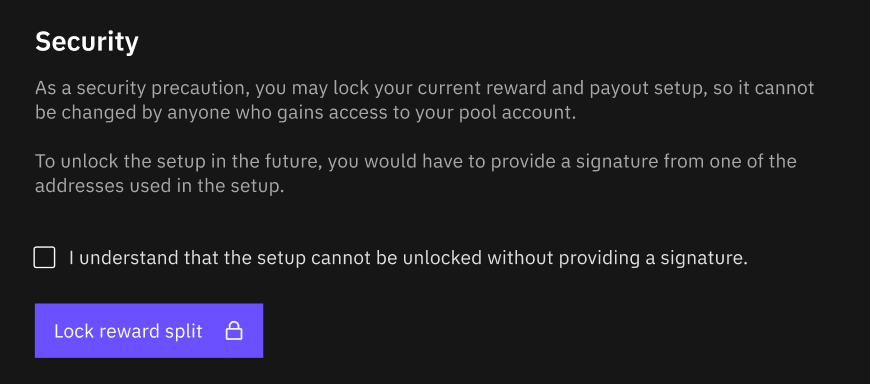
For security reasons, unlocking the payout setup can only be done by providing a signature from one of the wallets used in the payout setup to our support team. We will then verify the signature belongs to your registered wallet and unlock the payout setup. In other words, it is not possible for a user to unlock the payout setup by themselves.
Thanks to Payout Setup Lock, even if your Braiins Pool account is compromised, there is no way for the hacker to steal your mining rewards. However, since we do not require our miners to verify their personal identity in order to use a mining account, the only way to safely ensure the integrity of the request to unlock a reward split is by requiring a wallet signature.
If you want to make your account more secure without locking the reward split (or simply in general), we strongly recommend that you set up 2-Factor Authentication (2FA).
What is a reward splitting function and how to use it?
The reward splitting function allows you to distribute your mining revenue according to a customizable breakdown.
For example, a mining company with 3 equal partners can set up a reward split that automatically sends 1/3rd of the total rewards to each partner.
Another potential use case is splitting the rewards between hot and cold storage wallets. For example, 60% of rewards are automatically sent to a hot wallet used to pay for electricity, labor, etc., while the remaining 40% is sent to cold storage for long-term holding.
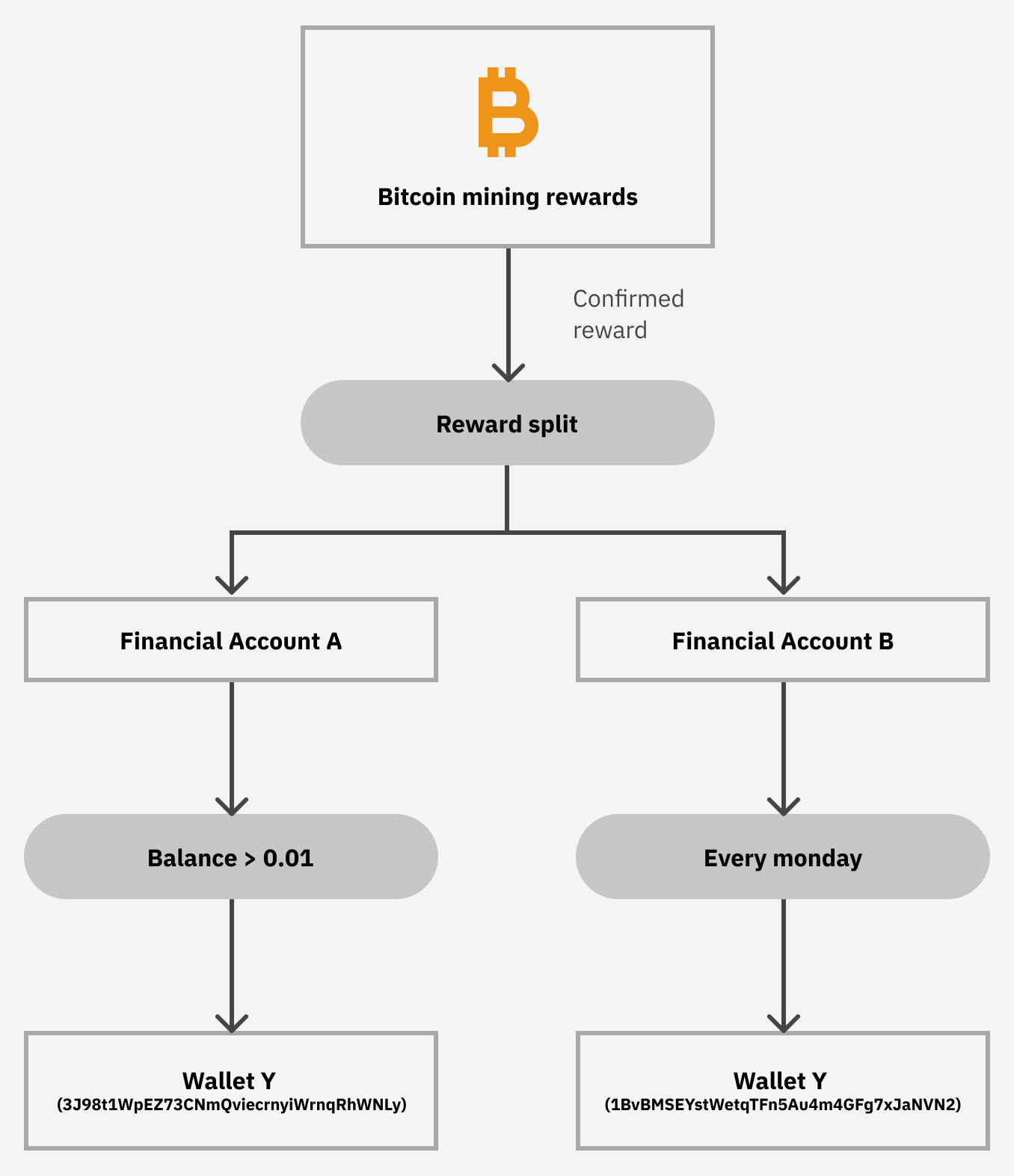
You can set up your Reward split in the menu Mining > Settings > Reward Split.
Payouts
How to customize my Payout Rule?
Every Financial Account has a Payout Rule so that you can control where your rewards are distributed and when. To find this, go to the Funds tab and then select the Financial Account you wish to configure. After you select the desired Financial Account, your screen should look like the image below. Note that selected payout network (onchain or Lightning) is indicated by an icon.
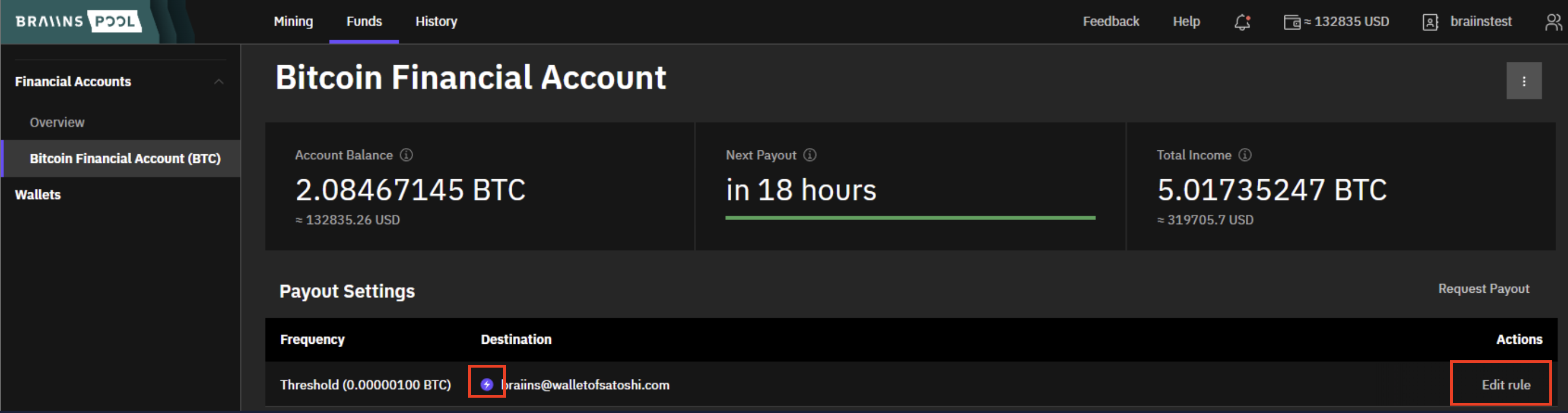
Now under Payout settings, click the "Edit rule" link on the right side of the screen in the Actions column of the table. This will bring up the popup shown below.
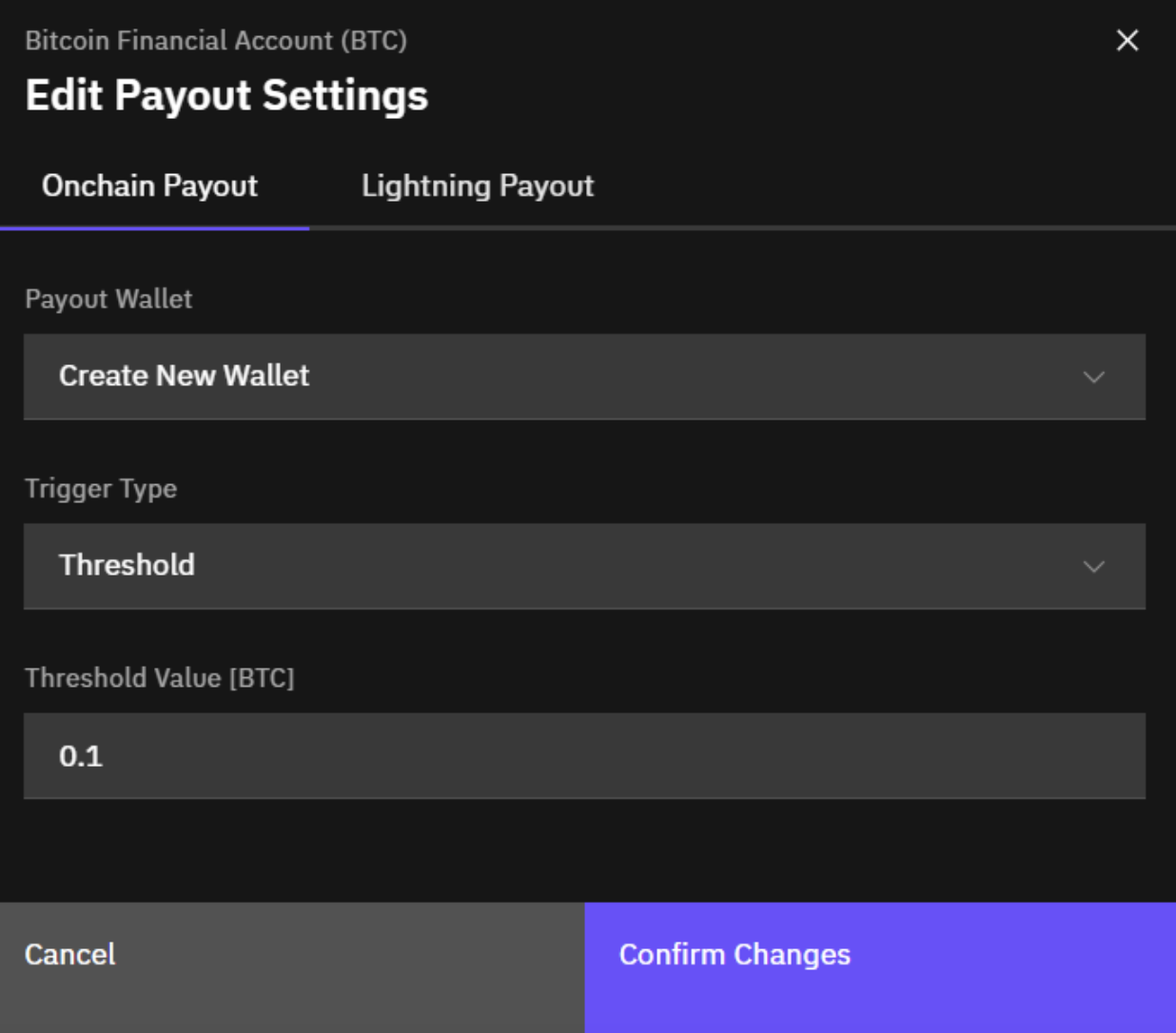
Here you can select the payout network (onchain or Lightning), wallet (or Lightning address) for receiving payouts (or add a new wallet), and you can set up your Payout Trigger to be based on time (e.g. daily, weekly, or monthly) or amount (e.g. 0.1 BTC).
How can I add a new payout address (wallet) to my account?
To add a new wallet to your account, follow the instructions below:
- Go to the Funds tab in the main Braiins Pool menu.
- Click Wallets on the left-side menu.
- Click the Add New Wallet button in the top right corner. A popup will appear as shown below.
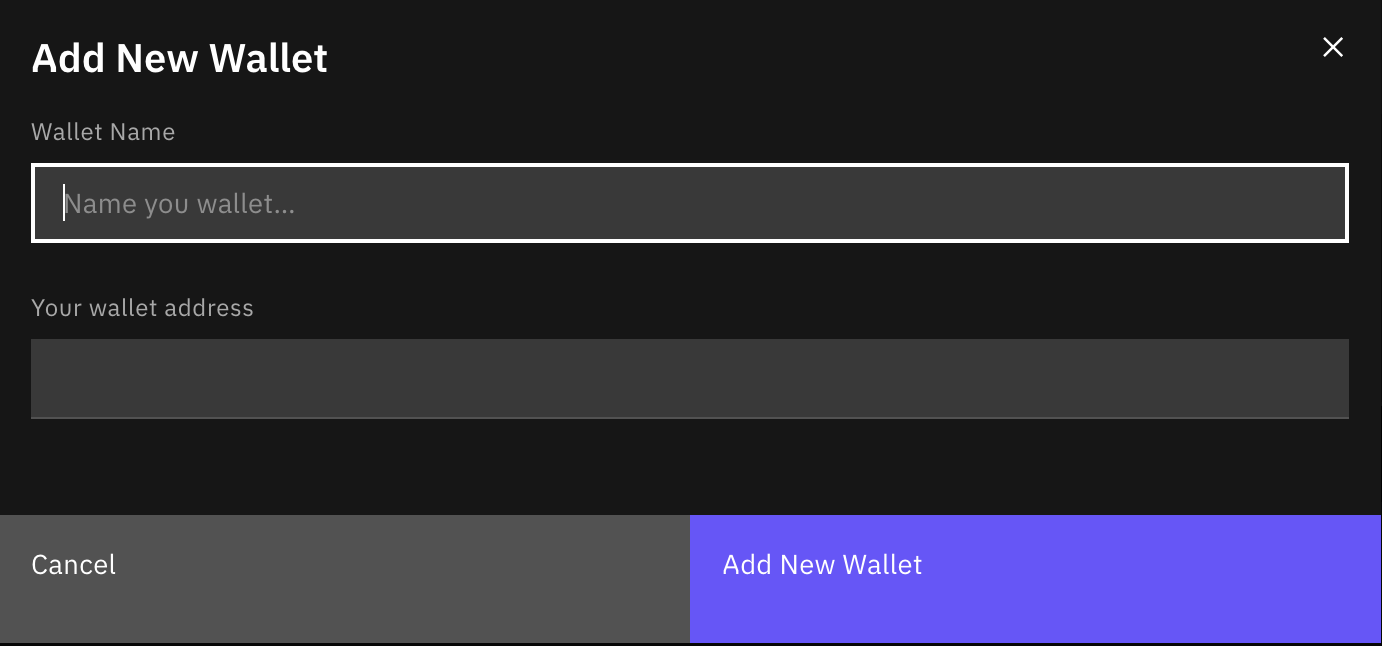
- Click the Add New Wallet button on the popup to confirm the setup.
Note: There is no need to manage Lightning addresses.
How can I lock payout address to increase account security?
If you set up a payout rule to your wallet address, you can lock it to prevent any change of this address to anyone who gains access to your pool account. Locking of your payout address can be done in the Mining > Settings > Payout Setup Lock menu. In order to lock your payout address, your payout setup cannot have any pending e-mail confirmations.
Note: you will still be able to change your payout threshold value, or trigger type (threshold or time interval). Only changes of payout wallet or lightning address will not be possible.
If I lock my payout address, can it be unlocked?
As a security precaution, it is possible to lock your current payout address, so it cannot be changed by anyone who gains access to your pool account. Locking of your payout address can be done in the Mining > Settings > Payout Setup Lock menu. However, once you lock your payout address, please be sure that you have a backup of it stored somewhere safe. You will need it once you decide to unlock it.
To unlock your payout address you will need to sign a message with your wallet and provide us the signature. If you have any troubles with unlocking your payout address, please contact us and we'll look into it.
How can I change my wallet address (registered payout address)?
To change your registered payout address, follow the instructions below:
- Go to the Funds tab in the main Braiins Pool menu.
- Click the Financial Account that you wish to update with a different address.
- Under the Payout Settings section, go to the Actions column and click Edit Rule. A popup will appear where you can edit your payout settings.
- Under Payout Wallet, click the arrow on the right side to show the drop-down menu.
- Select the existing wallet that you wish to use, or click Create New Wallet to set up a new wallet for your account.
- Once your wallet is updated, check that the other payout settings are okay and then click Confirm Changes to complete the change.
How to request manual payout?
To request a manual payout, navigate to the Funds tab in the main Braiins Pool menu and select the Financial Account you wish to withdraw from. Beneath the account information is Payout Settings, and to the right of that section heading you will see Request payout. This is available only in case onchain payout rule is active. There is no manual payouts for Lightning payout rules.
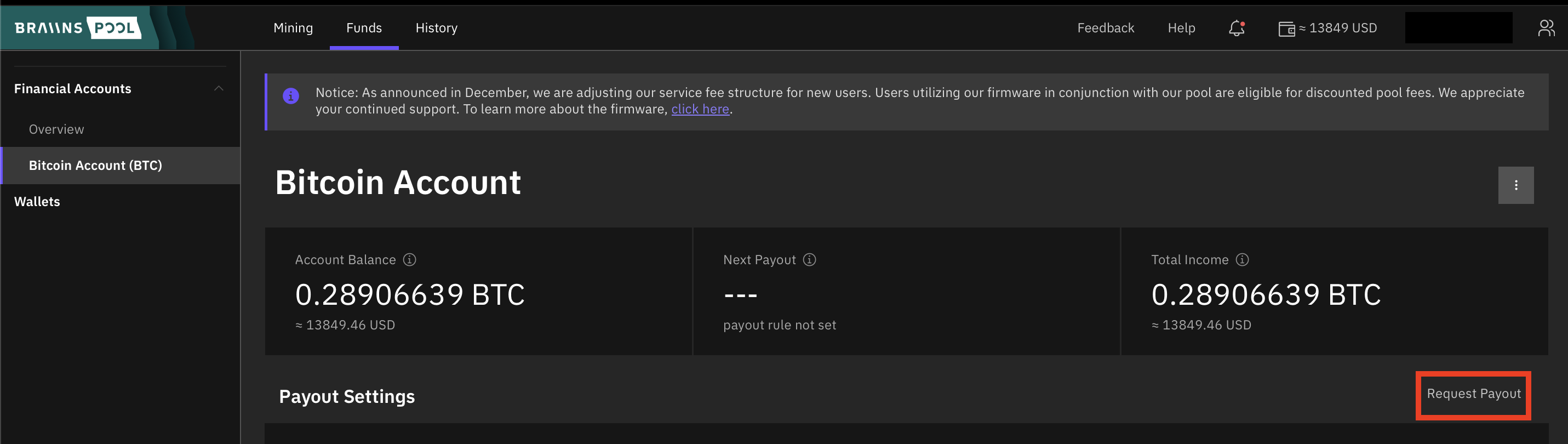
Simply click the Request payout text and a popup will appear to confirm that you wish to send the full balance of the account to your listed wallet address. To confirm, just click Request Payout and we'll send you the payout in the next payout period (typically next day at 9.00 UTC).
What happened to hourly payouts?
We used to process payouts on hourly basis. This has changed after switch to FPPS in December 2023 and all payouts are processed daily at 9.00 UTC.
Why are my payouts pending?
Processing of payouts results into blockchain transaction being created in the mempool.
We estimate the fee based on current network fees dynamically. However it can happen, that the fees are rising at the time of transaction creation and the original estimated fee is not high enough.
This can take few hours but also few days before the fees decrease again and the transactions are mined. We monitor such situations and in case of significant delays we accelerate such transactions.
In case you don't want to wait, you can use CPFP (Child Pays For Parent) concept and accelerate your transaction by yourself.
How to pause my payouts?
To prevent any money from leaving your account, you can pause all payouts. First, navigate to the Funds tab in the main Braiins Pool menu. On the right side of your screen at the top you'll see a button to Pause All Payouts.
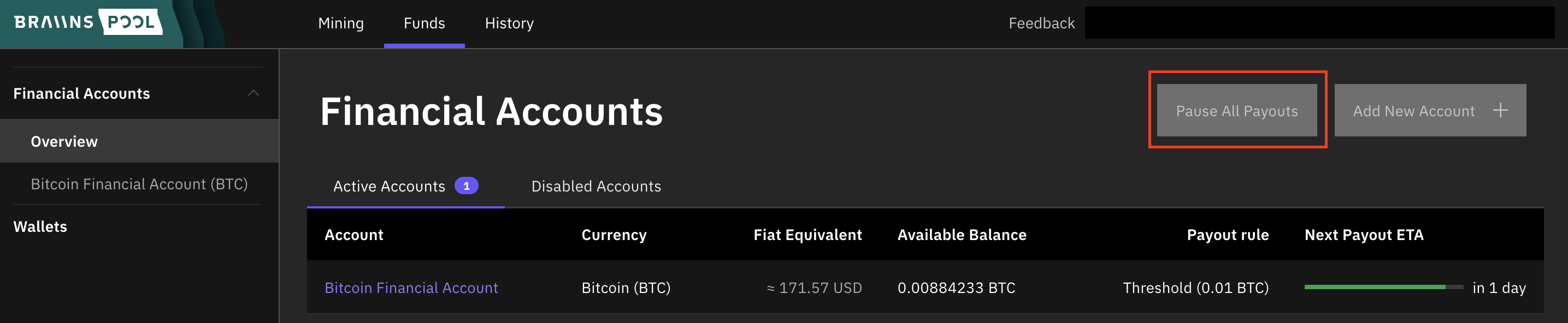
When you click the button, a popup will appear and you'll be asked to confirm that you wish to override your payout rules and stop all payouts indefinitely. To proceed, just click the Pause button.
How to resume my payouts?
If you have paused your payouts, you can resume them by navigating to the Funds tab in the main Braiins Pool menu. On the right side of your screen at the top you'll see a button to Resume Payouts.

When you click the button, a popup will appear and you'll be asked to confirm that you wish to resume your payouts. To proceed, just click the Resume button and enter your account password. If you have set up 2-factor authentication, you'll be asked to input your 2FA password in order to confirm the action.
Can I receive my payouts to a Segwit address?
You can set any valid Bitcoin address as your payout address. That includes:
P2PKH(addresses starting with 1)P2SH(starting with 3, most commonly SegWit addresses)bech32(addresses starting with bc1, native SegWit addresses)bech32m(Taproot, addresses starting with bc1)
What is a wallet (address) signature?
Some wallets such as exchange accounts do not have the ability to sign a message. Make sure that you are able to sign a message with your wallet before locking your payout setup, otherwise we will not be able to verify you using this method.
Cryptocurrency wallets each have a public and private key pair that enables the wallet's owner to securely verify their own transactions. The private key is used to digitally sign messages or other data packets such as Bitcoin transactions, verifying that the data has not been tampered with and that it's authentic (coming from the owner of the wallet). Therefore, providing a digital signature created by your wallet's private key is a good way to verify that you own a mining account associated with that wallet.
For more details on how wallet signatures work, see public key cryptography.
What are the Lightning payouts and how to use them?
Lightning network is a 2nd layer network built upon Bitcoin blockchain with the aim to transfer Bitcoin transactions instantly for nearly zero cost and at a scale.
Such transactions use peer-to-peer channels for transfer between point A and point B. For a lightning payout to work the sending and receiving party needs to have a route between them.
Braiins Pool runs its own Lightning node which has open channels to the most frequent wallet operators or routing nodes.
To accept such a payment users need to use a wallet of their choice or to run their own Lightning Node with channel(s) connected to Lightning network.
Are there any limits for Lightning payouts?
Lightning payouts at Braiins have no bottom limit - you can withdraw as low as 1 satoshi.
- These payouts are designed mainly for smaller miners to be able to get even small rewards (especially after halving).
- There is an upper limit of 0.005 BTC. Amounts above this limit can be paid out as free on-chain payouts.
We might increase the upper limit based on the feedback and demand in the future.
Which wallet should I use for Lightning payouts?
Users have a choice of custodian and self-custodian wallets.
Custodian wallets are those where funds are maintained by a third-party.
You don't have to worry about opening channels, but on the other hand you have to trust the third-party as you are not holding keys to the funds.
With self-custodial wallets you run your own lightning node on a mobile phone or computer. These require creation of a channel first which costs some fee.
You also have to close this channel if you want to transfer the funds to onchain balance.
Manual withdrawal works with any lightning wallet. Automated payouts via lightning address is supported only by some of the wallets see here.
What payout options via Lightning Network do you offer?
- Regular payouts - wallet with support of Lightning Address needs to be used. Lightning address has the same format as an email address. It gets translated into the URL, which returns a lightning invoice in the background. This usually works well with custodial wallets. Self-custodial (a.k.a. non-custodial) wallets can run into troubles if the user does not claim the transaction before the invoice expires. Regular payouts are triggered daily at 9.00 UTC.
- Manual withdrawals - this is the very basic lightning payment request where your wallet generates an invoice for a predefined amount of sats and you paste this invoice into our web. You can request manual withdrawal several times per day if you keep the total sum below 0.005 BTC. It gets processed within 60 minutes (usually 5 minutes after each hour).
What if my payout fails?
There are several reasons why a payment might fail.
When using lightning address:
- Lightning address provider does not provide correct callback to retrieve an invoice (for
username@domain.comyou can checkhttps://domain.com/.well-known/lnurlp/username, it should return some callback information - see here) - Payout is not between minimum or maximum acceptable amount (you can check the limits using
https://domain.com/.well-known/lnurlp/usernamefor yourusername@domain.comlightning address) - Payment was not claimed by the self-custodial wallet user (e.g. Zeus wallet) - each attempt has typically 24 hour expiration period and there are 2 other repetitions before it's marked as failed.
When using invoice:
- Expiration time of an invoice is too short - there may be up to 60 minutes before the invoice is used + additional time in case of self-custodial wallet to claim it. We recommend 24 hours expiration period.
- No route to the destination node - especially if you have your own node, make sure to have a good connectivity to lightning network.
There might be other reasons. Check with our support in case the payouts get constantly failed.
Can I have a dedicated Lightning channel with Braiins Pool?
We don't have the capacity to manage individual Lightning channels. We've opened channels to major wallet operators or major routing nodes and we will keep it that way.
We are using Lightning network solely for outgoing transactions. Since we don't plan on routing transactions of others, there is no reason to open channels with us. They won't be used.
When will you support BOLT12?
Current BOLT 11 invoices can be used only once since the preimage used for a security is revealed after the first payment. BOLT 12 comes with concept of offers and invoice requests. From user perspective they work similarly to LNURLs. Since the BOLT12 support is very limited, we don't have an ETA for its support now.