Contact Sales

Monitoring

Device Monitoring

Have your finger on the pulse.

Why should I care?

Since mining is usually considered as an investment, we believe that monitoring should be an essential part of your mining operation. Although your rewards are not directly affected by any monitoring settings, they can be better managed with few simple tools we have developed so far.

Monitoring helps you supervise how your miners work in time and minimizes losses caused by connection issues or mining hardware/software failures.

How can monitoring help?

Monitoring allows you to be alerted once a mining device starts misbehaving. Notifications are sent via e-mail or in your mobile app. E.g. there are communication issues between your miner and our pool. Such alerts will help you to react faster and therefore minimize the financial impact of the outage.

Outages may typically have the following causes:

  • Internet connectivity issues
  • Hardware power-supply (PSU) failures
  • Mining hardware overheating
  • Mining software issues

Below you can find simple step-by-step instructions how to setup monitoring in order to keep track of how your mining equipment is doing.

How to enable monitoring?

  1. Enable sending monitoring emails (Mining > Settings > Reporting) or notifications (Mobile app).
  2. You can enable worker monitoring on each worker profile separately.
  3. Once the worker monitoring is enabled, the Alert limit can be set: a. Automatically - our system selects the Alert Limit based on the past performance of the worker b. Manually - You can set your own Alert Limit value

Once you enable monitoring for your workers you will see each worker in one of these states: OK, Low, Offline, Disabled.

Permanently Low or Offline worker states can be caused by a weak worker. We recommend to switch off monitoring for such workers. If it is not the case please do not hesitate to contact our support.

Please note: The pool keeps track of mining devices on a worker basis. This means that if you have more than one mining device connected to the pool as a single worker, monitoring and issue reporting covers all the mining devices in bulk. On the other hand, when you setup a designated worker name for every mining device you have (and connect them correctly), the pool can track down hash rate drops and report them to you for each mining device separately.

How does monitoring work?

The pool takes a snapshot of the effective hash rate for all your workers every 5 minutes. This value is then compared to Alert Limit (you setup this value while enabling the monitoring).

The period of 5 minutes is sufficient for collecting just enough data to calculate all the values with a certain accuracy without clogging our servers. With a Vardiff introduced, even a slow miner can submit sufficient amount of results.

Device monitoring states

There are 4 possible states of your worker, regarding monitoring. Every worker is always in one of the following states:

StateDescription
OKMeans that the worker's hash rate is greater or equal to alert limit. This is the desired state. If everything works properly and the configuration is correct, you should see this state all the time
LowThis state signals that worker's hash rate is lower than it should be but the device still submits some shares. It was connected and working somehow at least part of the measuring period. A worker goes from OK to Low when its hash rate is lower than the alert limit for 2 consecutive periods. In the case you see this state for longer period of time, please create a ticket to our support.
OfflineYou could see this state when monitoring is enabled for the worker but there is no hash rate detected for the worker. The pool doesn't monitor the actual network connection of the worker. The only significant value is hash rate.
DisableWhen you switch off monitoring for a worker its state is reported as Disabled, regardless a fact if it submits some shares or not.

Mobile App

The mobile application offers a convenient overview of your mining and allows you to receive notifications for significant events of your choice such as:

  • worker issues (see device monitoring article for more details)
  • new block found
  • payout sent

Download the official application for Braiins Pool for free – available for Android and Apple iOS for iPhone.

Please be aware that our mobile app is not a mining app – it is an account monitoring tool. You will not be able to mine any coins with it.

How to set up the mobile app?

To monitor your user account in our official mobile app, please follow these steps:

  1. Download the application on your mobile device.
  2. On the Braiins Pool website go to User menu > Devices.
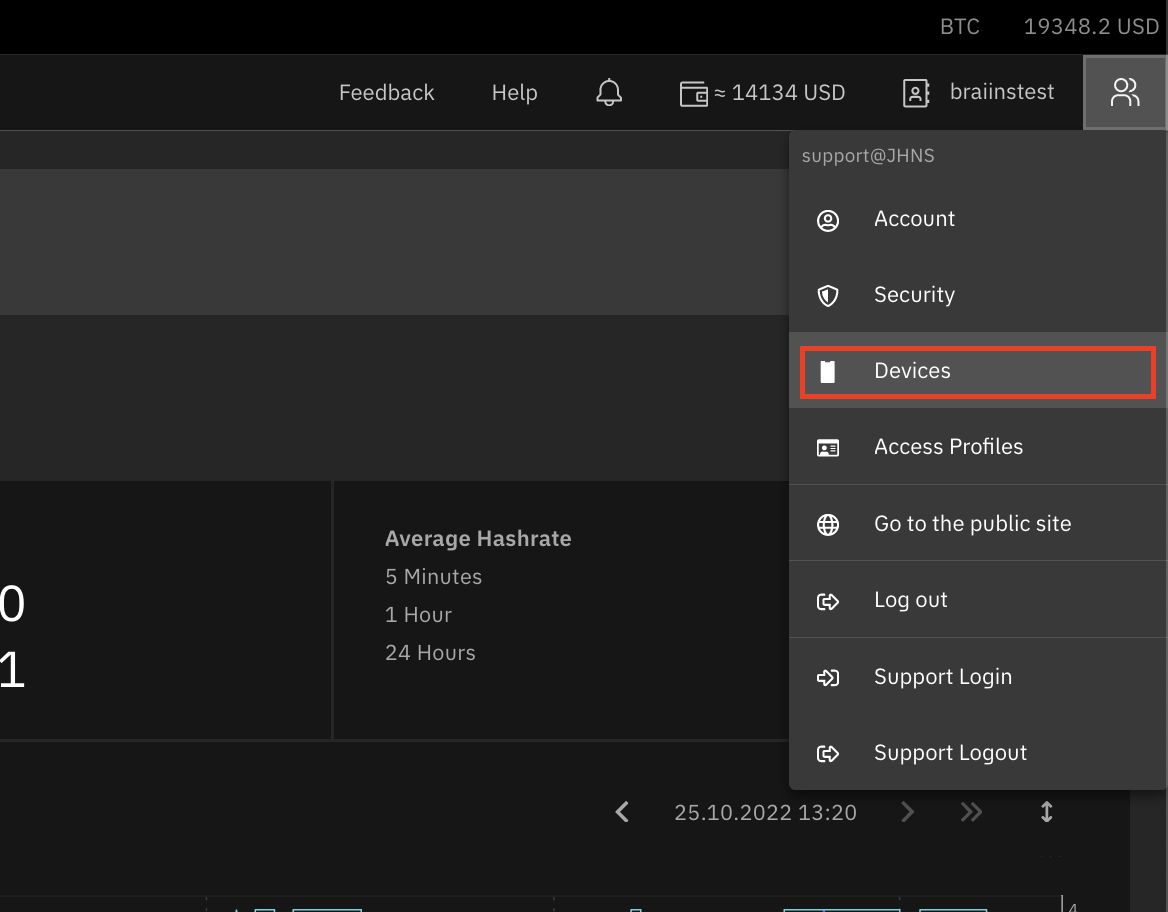
Dashboard

  1. Fill in the New device label field with a name of your choice and confirm by clicking on Connect.
  2. Connect the mobile app to your user account by either scanning the QR code in the mobile app or manually entering the token value in the mobile app.

In case you lost your mobile device, or you no longer want it to have access to your account, you can unlink the device in the Devices section. All device management options can be found in the Settings > Devices menu.

API configuration

Do you want to pull the mining stats/data and analyze them yourself? The pool API is here for you!

Overview

The pool API provides data in JSON fills on four endpoints: stats, profile, workers and payouts. You have to include the abbreviation of the selected coin (e.g. btc) and your access token in every API URL.

To acquire access token (API key) needed for API authentication, please follow these steps:

  1. Go to Settings > Access Profiles
  2. Select one of your access profiles or create a new one
  3. Select Allow access to web APIs in the access profile detail
  4. Click on Generate New token
  5. Save the changes

Each access profile has its own access token (in case API access is enabled). Access tokens can be regenerated any time, effectively canceling the former access token belonging to the selected access profile.

API authentication

An access profile token has to be included in the HTTP header field named Pool-Auth-Token or X-Pool-Auth-Token to authenticate your requests.

Example request using cURL:

curl https://pool.braiins.com/stats/json/btc/ -H "Pool-Auth-Token: <your access token>"

API request limit

The API allows for approximately one request per five seconds (safe value). When you transiently exceed this limit, some of your requests will be ignored. In case the allowed request rate is exceeded greatly or over a longer period of time, your IP address might get banned. If that is the case, please contact us to resolve the situation.

Pool Stats API

Provides information about pool performance and recently found blocks.

URL:

https://pool.braiins.com/stats/json/btc

Sample out

{
    "btc": {
        "hash_rate_unit": "Gh/s",
        "pool_active_workers": 1,
        "pool_5m_hash_rate": 5727000000.74660415488,
        "pool_60m_hash_rate": 5617000000.9942200615822,
        "pool_24h_hash_rate": 5517000000.8851972672885,
        "update_ts": 1699938300,
        "blocks": {
            "549753": {
                "date_found": 1542002919,
                "mining_duration": 3423,
                "total_shares": 4640771710739,
                "state": "confirmed",
                "confirmations_left": 0,
                "value": "12.92594863",
                "user_reward": "0.00006194",
                "pool_scoring_hash_rate": 5878745444.967269
            }
        },
        "fpps_rate": 0.00000241
    }
}

General Pool Stats

FieldTypeDescription
hash_rate_unitstringunit used for the hash rate values
pool_5m_hash_ratenumberpool hash rate for the last 5 minutes
pool_60m_hash_ratenumberpool hash rate for the last 60 minutes
pool_24h_hash_ratenumberpool hash rate for the last 24 hours
update_tsnumbertimestamp when the stats were updated
blocksobjectinformation for the last 15 blocks (breakdown below)
fpps_ratenumberpay par share rate

Latest Blocks

FieldTypeDescription
date_foundnumberUnix time when given block was found
mining_durationnumberduration of the round leading to given block
total_sharesnumbernumber of shares collected during the round
statestringstate of given block
confirmations_leftnumbernumber of confirmations left
valuestringblock value
user_rewardstringuser reward for the given block
pool_scoring_hash_ratenumberpool scoring hash rate at the time when block was found

User Profile API

Provides information about users performance and rewards.

URL:

https://pool.braiins.com/accounts/profile/json/btc/

Sample out

{
    "username": "username",
    "btc": {
        "all_time_reward": "0.15000000",
        "hash_rate_unit": "Gh/s",
        "hash_rate_5m": 27978,
        "hash_rate_60m": 28191,
        "hash_rate_24h": 28357,
        "hash_rate_yesterday": 28197,
        "low_workers": 0,
        "off_workers": 0,
        "ok_workers": 2,
        "dis_workers": 2,
        "current_balance": "0.15000000",
        "today_reward": "0.000166667",
        "estimated_reward": "0.00011940",
        "shares_5m": 123,
        "shares_60m": 1476,
        "shares_24h": 35424,
        "shares_yesterday": 0
    }
}
FieldTypeDescription
usernamestringusername
all_time_rewardstringcumulative all-time reward
hash_rate_unitstringunit used for the hash rate values
hash_rate_5mstringaverage hash rate for the last 5 minutes
hash_rate_60mnumberaverage hash rate for the last 60 minutes
hash_rate_24hnumberaverage hash rate for the last 24 hours
hash_rate_yesterdaynumberaverage hash rate for the previous UTC day
low_workersnumbernumber of workers with low state
off_workersnumbernumber of workers with off state
ok_workersnumbernumber of workers with ok state
dis_workersnumbernumber of workers with disabled monitoring
current_balancestringcurrent reward balance
today_rewardstringconfirmed reward for this day
estimated_rewardstringestimated reward for the current block
shares_5mnumberactive shares for last 5 minutes
shares_60mnumberactive shares for last hour
shares_24hnumberactive shares for last day
shares_yesterdaynumberactive shares for yesterday

Daily Reward API

Provides information about about rewards for the selected time period. Returns last 90 days by default.

URL:

https://pool.braiins.com/accounts/rewards/json/btc?from=[from]&to=[to]
  • COIN: BTC
  • FROM: string representation of date in ISO format (YYYY-MM-DD)
  • TO: string representation of date in ISO format (YYYY-MM-DD)

Example URL request:

https://pool.braiins.com/accounts/rewards/json/btc?from=2024-11-30&to=2024-12-02
{
    "btc": {
        "daily_rewards": [
            {
                "date": 1733097600,
                "total_reward": "0.36361081",
                "mining_reward": "0.35648119",
                "bos_plus_reward": "0.00712962",
                "referral_bonus": "0.00000000",
                "referral_reward": "0.00000000",
                "calculation_date": 1733191200
            },
            {
                "date": 1733011200,
                "total_reward": "0.36361097",
                "mining_reward": "0.35648200",
                "bos_plus_reward": "0.00712960",
                "referral_bonus": "0.00000000",
                "referral_reward": "0.00000000",
                "calculation_date": 1733104800
            },
            {
                "date": 1732924800,
                "total_reward": "0.36361020",
                "mining_reward": "0.35648102",
                "bos_plus_reward": "0.00712973",
                "referral_bonus": "0.00000000",
                "referral_reward": "0.00000000",
                "calculation_date": 1733018400
            }
        ]
    }
}
FieldTypeDescription
datenumberUnix time (the first second of the date)
total_rewardnumberthe sum of all reward types for the day
mining_rewardnumberthe standard mining reward
bos_plus_rewardnumberthe amount refunded (pool fee refund) for mining with Braiins OS
referral_bonusnumberbonus received by being referred to Braiins OS
referral_rewardnumberreward earned for HR referred to Braiins OS
calculation_datenumbercalculation date timestamp

Daily Hashrate API

Provides information about daily averages of hashrate for user or user group.

URL:

https://pool.braiins.com/accounts/hash_rate_daily/json/[group]/btc

Where group is indicating if average hash rates should be returned for the user group. Variable coin is BTC.

Example URL request:

https://pool.braiins.com/accounts/hash_rate_daily/json/group/btc

Sample out

{
    "btc": [
        {
            "date": 1662674400,
            "hash_rate_unit": "Gh/s",
            "hash_rate_24h": 1073.7,
            "total_shares": 21600000
        },
        {
            "date": 1662588000,
            "hash_rate_unit": "Gh/s",
            "hash_rate_24h": 1000.7,
            "total_shares": 21200000
        }
    ]
}
FieldTypeDescription
datenumberUnix time (the first second of the date)
hash_rate_unitstringunit used for the hash rate values
hash_rate_24hnumberaverage hash rate for the last 24 hours
total_sharesnumbernumber of shares collected during the day

Block Rewards API

Provides information about block rewards.

URL:

https://pool.braiins.com/accounts/block_rewards/json/btc?from=[from]&to=[to]
  • COIN: BTC
  • FROM: string representation of date in ISO format (YYYY-MM-DD)
  • TO: string representation of date in ISO format (YYYY-MM-DD)

Example URL request:

https://pool.braiins.com/accounts/block_rewards/json/btc?from=2022-05-01&to=2022-05-07

Sample out

{
    "btc": {
        "block_rewards": [
            {
                "block_found_at": 1651804117,
                "pool_scoring_hash_rate": 4441768989.204721,
                "user_scoring_hash_rate": 12981.581642348925,
                "block_value": "12.59169582",
                "user_reward": "0.06366676",
                "block_height": 567815,
                "mining_reward": "0.06366676",
                "braiinsos_plus_mining_bonus": "0.00000000",
                "referral_reward": "0.00000000",
                "referral_bonus": "0.00000000",
                "confirmations_left": 0
            },
            {
                "block_found_at": 1651811734,
                "pool_scoring_hash_rate": 4441768989.387698,
                "user_scoring_hash_rate": 13041.508413918604,
                "block_value": "12.66780812",
                "user_reward": "0.07129083",
                "block_height": 567816,
                "mining_reward": "0.07129083",
                "braiinsos_plus_mining_bonus": "0.00000000",
                "referral_reward": "0.00000000",
                "referral_bonus": "0.00000000",
                "confirmations_left": 0
            }
        ],
        "hash_rate_unit": "Gh/s"
    }
}
FieldTypeDescription
block_found_atnumberunix timestamp (UTC), when the block was found
pool_scoring_hash_ratenumbertotal scoring hash rate of the pool at time when the block was found
user_scoring_hash_ratenumbertotal scoring hash rate of the user at time when the block was found
block_valuestringtotal value of the block
user_rewardstringtotal reward amount for the user
block_heighnumbernumber of the block within the coin's blockchain
mining_rewardstringamount of mining reward for delivered shares on the block
braiinsos_plus_mining_bonusstringpool fee refund for mining with Braiins OS device
referral_rewardstringpool fee refund for mining with Braiins OS device and with special referral code
referral_bonusstringpool fee refund for propagation of Braiins OS with dedicated referral code
confirmations_leftnumbernumber of confirmations left

Worker API

Provides performance data for each one of users worker.

URL:

https://pool.braiins.com/accounts/workers/json/btc

Sample out

{
    "btc": {
        "workers": {
            "username.worker1": {
                "state": "ok",
                "last_share": 1542103204,
                "hash_rate_unit": "Gh/s",
                "hash_rate_scoring": 15342,
                "hash_rate_5m": 14977,
                "hash_rate_60m": 15302,
                "hash_rate_24h": 15351,
                "shares_5m": 90304,
                "shares_60m": 1125762,
                "shares_24h": 20945364
            },
            "username.worker2": {
                "state": "ok",
                "last_share": 1542103200,
                "hash_rate_unit": "Gh/s",
                "hash_rate_scoring": 12952,
                "hash_rate_5m": 13001,
                "hash_rate_60m": 12889,
                "hash_rate_24h": 13006,
                "shares_5m": 90304,
                "shares_60m": 1125762,
                "shares_24h": 20945364
            }
        }
    }
}
FieldTypeDescription
last_sharenumberUnix time of the last accepted share
statestringstate of the worker (ok/low/off/dis)
hash_rate_unitstringunit used for the hash rate values
hash_rate_scoringnumbercurrent scoring hash rate
hash_rate_5mnumberaverage hash rate for the last 5 minutes
hash_rate_60mnumberaverage hash rate for the last 60 minutes
hash_rate_24hnumberaverage hash rate for the last 24 hours
shares_5mnumberactive shares for last 5 minutes
shares_60mnumberactive shares for last hour
shares_24hnumberactive shares for last day

Payouts API

Provides data for payouts transactions.

URL:

https://pool.braiins.com/accounts/payouts/json/btc?from=[from]&to=[to]
  • COIN: BTC
  • FROM: string representation of date in ISO format (YYYY-MM-DD)
  • TO: string representation of date in ISO format (YYYY-MM-DD)

Example URL request:

https://pool.braiins.com/accounts/payouts/json/btc?from=2022-05-01&to=2022-05-07

Sample out

{
    "onchain": [
        {
            "financial_account_name": "Bitcoin Account",
            "requested_at_ts": 1721997284,
            "resolved_at_ts": 1721999584,
            "status": "confirmed",
            "amount_sats": 50000,
            "fee_sats": 1000,
            "destination": "bc1qxy1kgdycjrsqtcq2n0yrf3493p83kkfjhx0w2h",
            "tx_id": "a5f3e1f0a8e7f2d8c0c4f9b2b7b0b1a0987654321",
            "trigger_type": "triggered"
        },
        {
            "financial_account_name": "Bitcoin Account",
            "requested_at_ts": 1722997284,
            "resolved_at_ts": 1722999584,
            "status": "queued",
            "amount_sats": 1000000,
            "fee_sats": 0,
            "destination": "bc1qxy1kgdycjrsqtcq2n0yrf3493p83kkfjhx0w2h",
            "tx_id": null,
            "trigger_type": "triggered"
        }
    ],
    "lightning": [
        {
            "financial_account_name": "Bitcoin Financial Account",
            "requested_at_ts": 1712846879,
            "resolved_at_ts": 1712846885,
            "status": "confirmed",
            "amount_sats": 441348,
            "fee_sats": 0,
            "destination": "braiins@walletofsatoshi.com",
            "invoice": "lnbc4413480n1pnp07prpp5e8jnrtyvq6rlef4nzzkgepn8j054u3sk3l9ar5rf0tha0tzjmhzqhp5m7l6c8fmknqvsqfdlp3h49899s7zcsx9gzfu0vhvad053k5ewj0qcqzzsxqyz5vqsp5thnzqf8q4lxufz60xt57s6r4ylr2c5ap6x5n7uc56y8lnmnyn06q9qyyssq7w3rd8e2s8wgyqkpdcqdl5wd8zakslpqp5kdchgew6h5t0wkrwg4nxmhd7yqpr0mqf4kudx9x8ntmxccv9lgjlcj4ud358n6as58mhqprhaglh",
            "preimage": "93a0049b3963b7bd8d9d3e97cff2975745f83fa94562b4a0db208fe8cddcb3e5",
            "trigger_type": "triggered"
        },
        {
            "financial_account_name": "Bitcoin Financial Account 2",
            "requested_at_ts": 1712856879,
            "resolved_at_ts": 1712856885,
            "status": "failed",
            "amount_sats": 527,
            "fee_sats": 0,
            "destination": "braiins@walletofsatoshi.com",
            "invoice": null,
            "preimage": null,
            "trigger_type": "triggered"
        },
        {
            "financial_account_name": "Bitcoin Financial Account",
            "requested_at_ts": 1728983117,
            "resolved_at_ts": 1728983290,
            "status": "confirmed",
            "amount_sats": 12321,
            "fee_sats": 0,
            "destination": "braiins@walletofsatoshi.com",
            "invoice": "lnbc4413480n1pnp07prpp5e8jnrtyvq6rlef4nzzkgepn8j054u3sk3l9ar5rf0tha0tzjmhzqhp5m7l6c8fmknqvsqfdlp3h49899s7zcsx9gzfu0vhvad053k5ewj0qcqzzsxqyz5vqsp5thnzqf8q4lxufz60xt57s6r4ylr2c5ap6x5n7uc56y8lnmnyn06q9qyyssq7w3rd8e2s8wgyqkpdcqdl5wd8zakslpqp5kdchgew6h5t0wkrwg4nxmhd7yqpr0mqf4kudx9x8ntmxccv9lgjlcj4ud358n6as58mhqprhaglh",
            "preimage": null,
            "trigger_type": "manual"
        },
        {
            "financial_account_name": "Bitcoin Financial Account",
            "requested_at_ts": 1728983167,
            "resolved_at_ts": 1728983330,
            "status": "queued",
            "amount_sats": 11360,
            "fee_sats": 0,
            "destination": "braiins@walletofsatoshi.com",
            "invoice": "lnbc4413480n1pnp07prpp5e8jnrtyvq6rlef4nzzkgepn8j054u3sk3l9ar5rf0tha0tzjmhzqhp5m7l6c8fmknqvsqfdlp3h49899s7zcsx9gzfu0vhvad053k5ewj0qcqzzsxqyz5vqsp5thnzqf8q4lxufz60xt57s6r4ylr2c5ap6x5n7uc56y8lnmnyn06q9qyyssq7w3rd8e2s8wgyqkpdcqdl5wd8zakslpqp5kdchgew6h5t0wkrwg4nxmhd7yqpr0mqf4kudx9x8ntmxccv9lgjlcj4ud358n6as58mhqprhaglh",
            "preimage": null,
            "trigger_type": "triggered"
        }
    ]
}
FieldTypeDescription
financial_account_namestringname of the financial account
requested_at_tsnumberUnix time of the request
resolved_at_tsnumberUnix time of the payout resolution
statusstringstatus of the payout (queued/confirmed/failed)
amount_satsnumberamount of the payout in satoshis
fee_satsnumberamount of the payout fee in satoshis
destinationstringdestination address of the payout (onchain address or lightning invoice)
tx_idstringtransaction id of the payout (onchain only)
invoicestringlightning invoice of the payout (lightning only)
preimagestringpreimage of the payout (lightning only)
trigger_typestringtype of the payout trigger (triggered/manual)

Was this helpful?