Autotuning
Autotuning to get more BTC per Watt of energy consumed
Every ASIC is unique. Whether you use "ASIC" to refer to a mining rig or to the individual chips inside it, this statement remains true.
In the manufacturing of ASIC chips, small variations in the process, voltage, and temperature of the semiconductor die can all result in on-chip variations. When you are working on the scale of single-digit nanometers and measuring individual atoms, even "tiny" imperfections and alignment issues in the semiconductor manufacturing process have a significant impact on the performance of the circuits. This is why every ASIC is unique.
Historically, bitcoin mining hardware manufacturers have grouped together chips into batches based on quality and then treated them uniformly. OEM (stock) firmwares often don't allow for basic functionality like under / overclocking, let alone adjusting frequencies and voltages on individual chips / hashboards.
Braiins OS is built to help miners realize the extra potential of their machines by improving the efficiency (W/TH) at any power level.
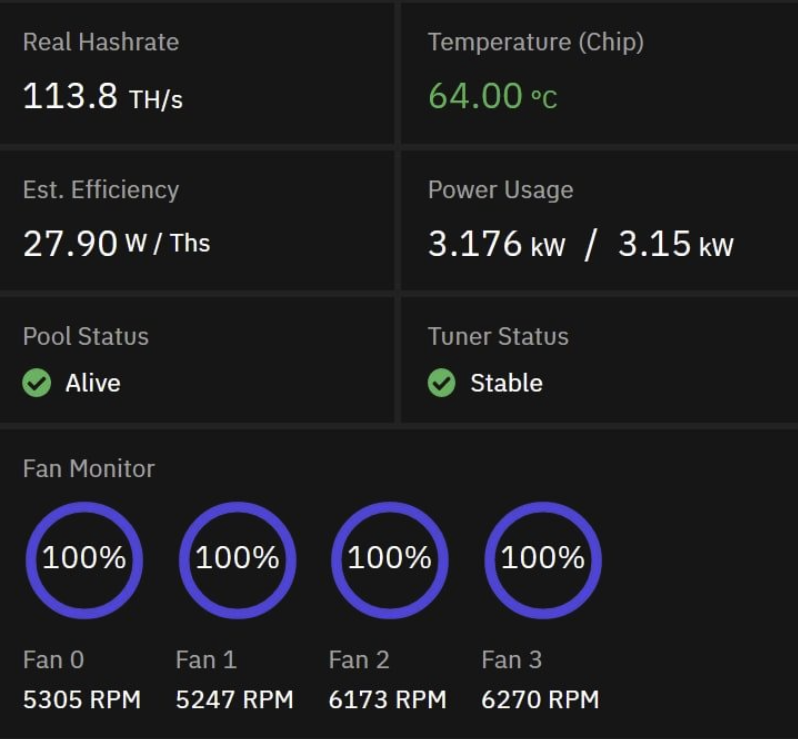
A 96 TH S19j Pro (29.5 J/TH), running BOS with better efficiency and more hashrate
What Autotuning Does
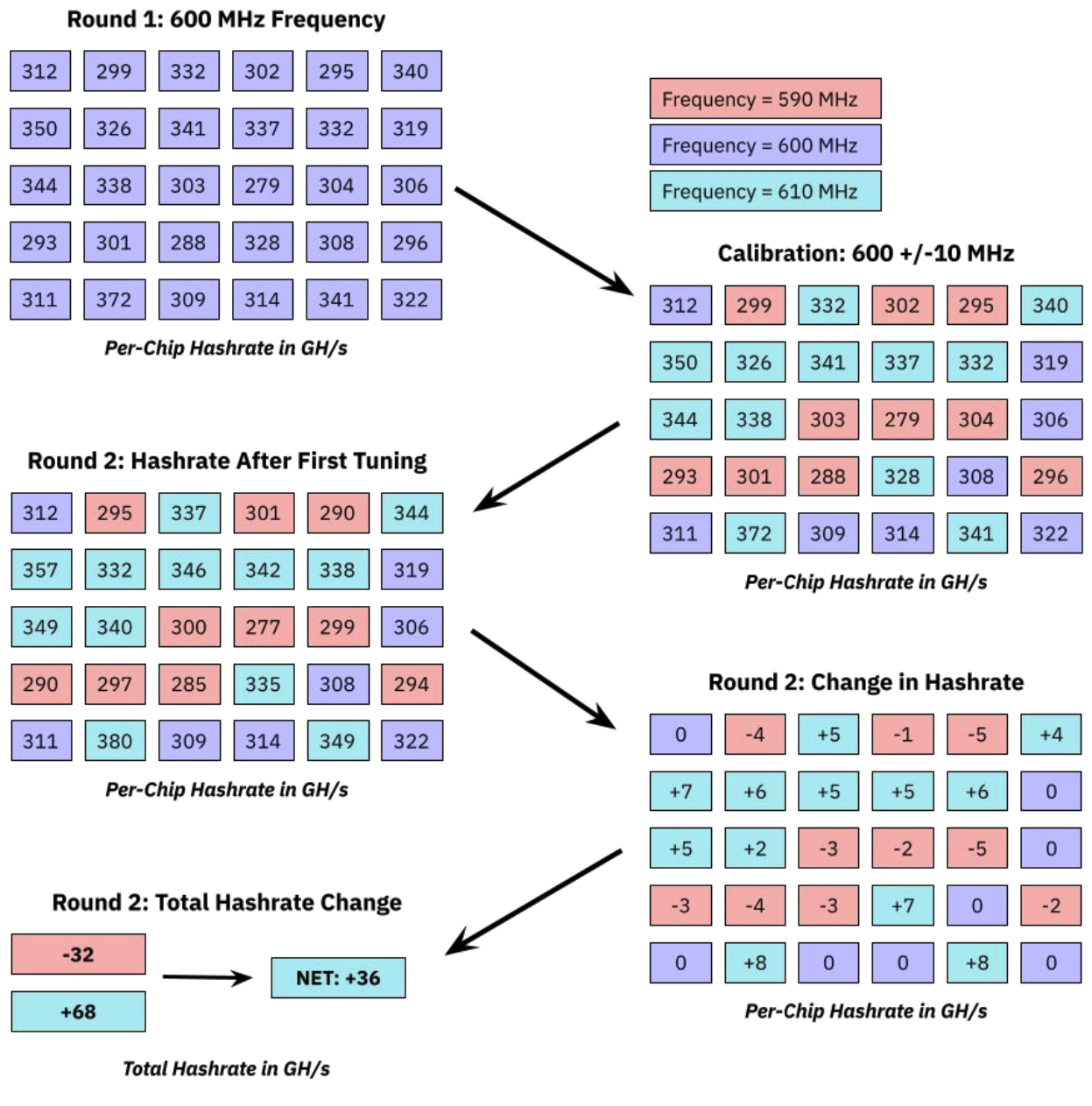
The idea behind autotuning is simple: if all the chips in a mining rig are unique, we should treat them as such. Rather than having uniform frequencies across all chips in the machine, we use a trial and error "tuning" process to determine the quality of each chip. Higher quality chips can perform well with higher frequencies and produce more hashrate.
Lower quality chips don't produce as much hashrate per Watt, so we give those chips less work to do. By automatically finding the optimal settings for each chip, we help you utilize the full potential of your hardware at whatever power consumption level you set it to.
Hashboard power consumption
Braiins OS assumes you have 3 hashboards and will take these values and apply 1/3 of the power limit to each hashboard. Even if a hashboard is disabled / removed / damaged, it will still apply 1/3 the power to each.
Example: Running a x19 at 3000W with 1 working hashboard will only apply 1000W to the single hashboard. Feel free to scale the power accordingly but understand the limitations of the hashboard, PSU and the circuit.
Factors that Impact Performance
In the illustration on the previous page, you can see the (oversimplified) logic of the autotuning process. It starts with some universal settings for frequencies and voltages to see how each chip performs, then begins calibrating per-chip settings based on those results. Now imagine that instead of just +/- 10 MHz frequency adjustments and a single round of tuning, you have possible adjustments of +/- 5, 10, 15, or 20 MHz per chip across hundreds of chips per machine.
It's a process, and the results aren't going to be the same for every machine. Some machines will be in better condition, perhaps better located in the facility for cooling, and with higher quality chips. Those machines might see a 15%+ improvement in J/TH efficiency while others will only improve by 5% with the exact same configuration on Braiins OS. Again, every ASIC is unique.
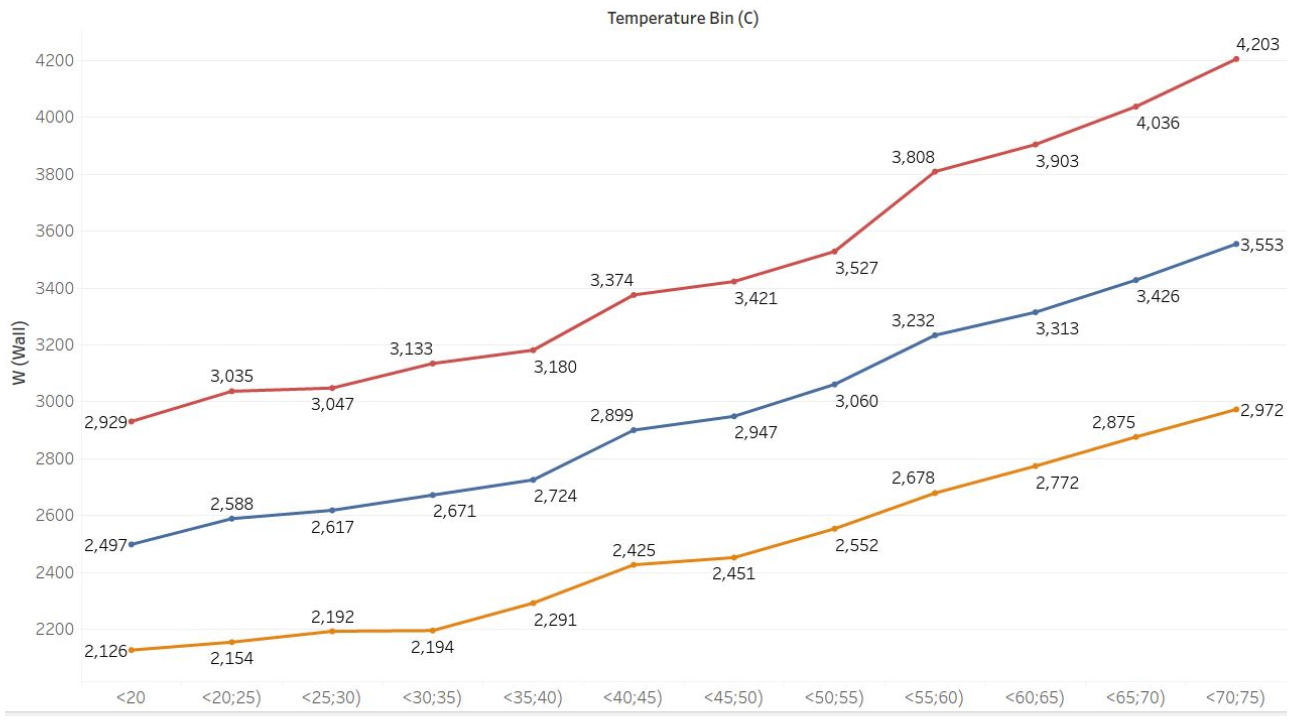
Also, important to understand is the impact of temperature on the autotuning performance. We've documented how high temperatures result in significant increases in power consumption for the Antminer X19 family of hardware, but an extra detail to note is that temperature differences at the time of tuning as well as temperature variations during the autotuning process itself can materially affect the results.
In other words, chips will behave differently if tuned at 20°C vs. 30°C ambient temperatures (unless you have very effective cooling to diminish the impact of ambient temperatures on the actual chip temperatures). For this reason, we recommend that you don't adjust fan speeds below 100% during tuning if your machines are air cooled in hot weather, and that you start the tuning during a relatively cool and stable part of the day (early morning or evening) if possible.
What to Expect
Machines can be tuned in about 10 minutes during which time the hashrate of the machine will fluctuate noticeably. This is completely normal and nothing to worry about. Tuning results save periodically throughout the process, so you never have to start from zero on a given power limit in case your miners have to shut down before the tuning completes.
Once the tuning is finished, the settings "profile" is saved, and you can return to it at any time in the future and immediately apply it without waiting for the machine to re-tune.