Curtailment
Overview
Curtailment in Braiins Manager enables users to pause mining activity to manage energy consumption, either during planned maintenance, high energy price periods, or in response to signals from Curtailment Service Providers (CSPs).
Curtailments are managed through the Curtailment page, where users can view upcoming and previous dispatches.
There are four main types of curtailment:
- Immediate Actions: Users can manually pause or resume mining.
- Scheduled Curtailment: Users define specific time periods for curtailment.
- CSP API Dispatch: Curtailment triggered by third-party CSP signals.
- Strike Price: Curtailment is triggered when the day-ahead energy price exceeds the defined strike price. See more here.
Immediate Action
This type of curtailment allows users to trigger an immediate Pause or Resume of mining activities. To apply this, go to the Curtailment page and click the "Action" button. From there, miners can be selected using filters such as Location or Customer. This option provides flexibility to pause or resume mining based on real-time needs, like energy price spikes or maintenance events.
Scheduled Curtailment
With scheduled curtailment, users can define their own custom schedules to automatically pause or reduce mining activity during specified times. This feature allows you to set start and end times for curtailment events, enabling precise control over when curtailment will occur. By pre-planning these schedules, you can ensure that energy consumption is minimized during peak periods or when electricity prices are high, all while maintaining operational flexibility.
How to Use Scheduled Curtailment:
- Click the "Create Schedule" button.
- Name the curtailment event.
- Select the miners from the Workers list that will participate.
- Choose the start date and time for the curtailment.
- Choose the end date and time for the curtailment.
Curtailment API Integration
API Integration enables seamless communication with Curtailment Service Providers (CSPs). Through the Curtailment API, miners receive real-time signals from CSPs, automating load adjustments based on demand.
How to Use Curtailment API Integration:
- Navigate to the Curtailment tab and click Connect API.
- Select your CSP from the list or request integration with a new CSP.
- Input the required credentials, and the system will automate curtailment based on API signals.
Supported Curtailment Service Providers
Braiins Manager supports integration with the following CSPs:
Strike Price Curtailment
Strike Price Curtailment in Braiins Manager automatically pauses mining when electricity prices exceed a user-defined threshold (strike price), and resumes mining when prices fall below that threshold. This helps miners avoid high energy costs while maintaining profitability. See this page for more information.
Notifications
You can subscribe to Telegram notifications for curtailment events so you are alerted when a curtailment is scheduled, starts, or ends without having to watch the dashboard.
Subscriptions are managed per user in Settings > Notifications, under the Get Notified About area. Each curtailment source has its own toggle:
- CSP - events from external Curtailment Service Providers.
- Strike Price - events from Strike Price Curtailment.
- Price Adapt - events from Price Adapt.
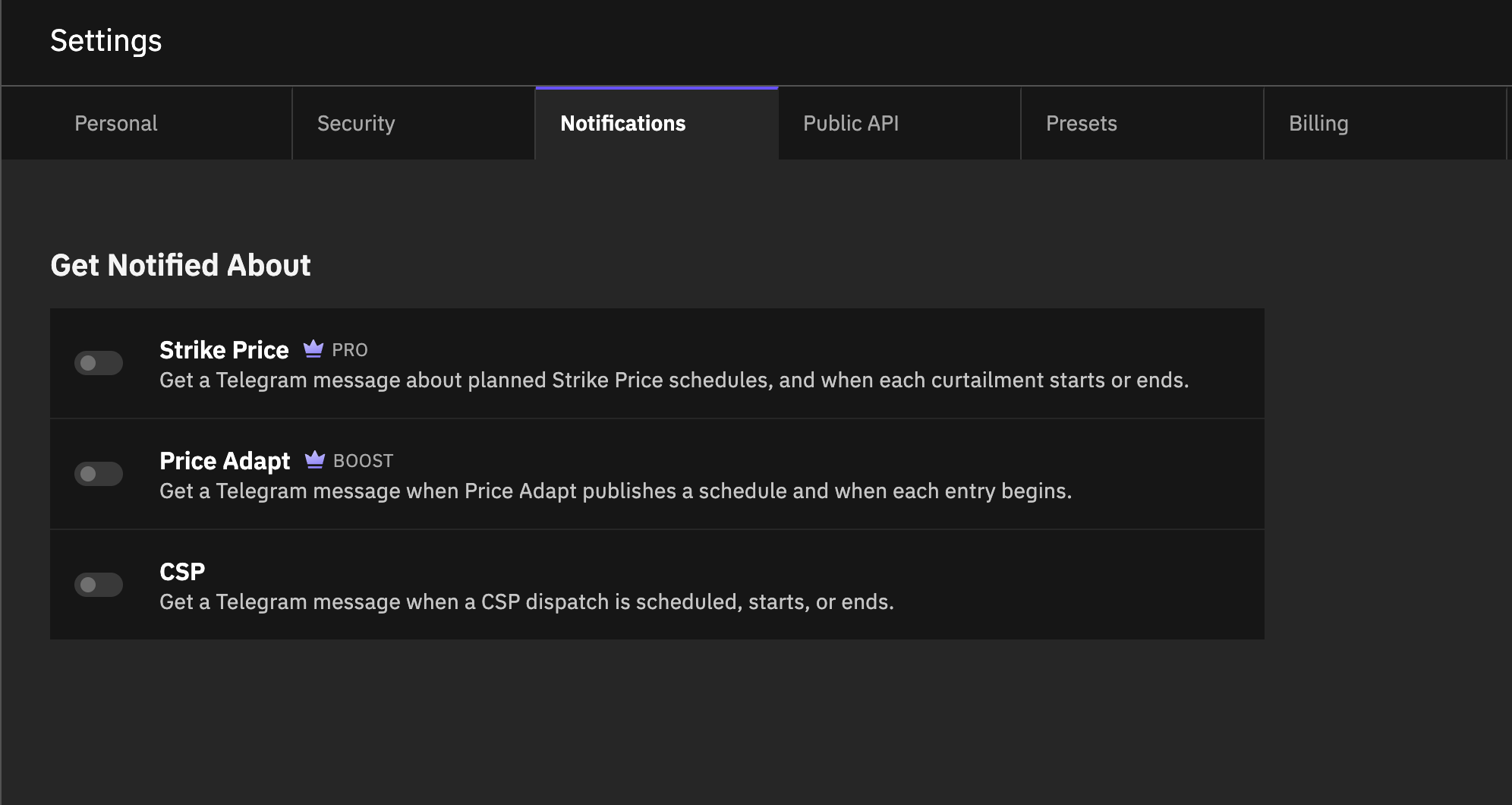
To subscribe:
- Go to Settings > Notifications.
- In the Get Notified About area, flip the toggle for the source you want.
- The preference saves automatically, and you receive a confirmation message on your paired Telegram.
Notifications are delivered over Telegram only. Pair a Telegram channel under Settings > Notifications > Channels first; until you do, the toggles stay disabled with a tooltip explaining why. A toggle is also disabled if that curtailment source isn't enabled for your account.
You are notified at each stage of a curtailment's lifecycle: when it is created, when execution starts, and when execution ends.
Notifications follow your access. Provider Admins receive events across the whole provider, while other users receive events only for the locations they can access. If you lose access to Curtailment, the subscription is cleared automatically and you must opt in again once access is restored.
Monitoring Curtailment Events
The Curtailment Dashboard allows you to track all curtailment activities, including upcoming, active, and historical events. The dashboard provides insights such as:
- Curtailment type (manual, via CSP API, or via Strike Price)
- Start and end times
- Duration of curtailment
- Affected location(s)
- Customer participation
In addition, the Power Graph in the Dashboard page shows power consumption over time, highlighting periods of curtailment. Active curtailments are indicated by a notification in the top-right corner of the user interface.