FAQ: Troubleshooting
Troubleshooting
Braiins OS hardware issues (i2c, crc, etc)
- Make sure the device is connected to the ground at all times (case and PSU). Read the Bitmain article here.
- Check that all settings are default (Delete any value, then Save & Apply).
- Try reducing the power limit. Wait at least 12 hours for Tuner Status to show Stable. If you have a Beagle Bone Black control board, the time can be 1 or 2 days due to the single core, low speed CPU.
- Check that the cables are well connected; try swapping or replacing them and tighten the power rail screws. If you see the "Short circuit" message in the logs, a screw is loose in the power rails. Be careful, they can break, so too much force is not recommended.
- Disable the hashboard in Configuration > Performance > Override Global Hash Chain about 6 hours.
- Try with another power supply unit, problems with the PSU can also manifest as HW errors.
- Clean the device carefully, if you use liquids you should wait a few days to dry fully.
If the problem persists, it probably has a physical issue that needs repair.
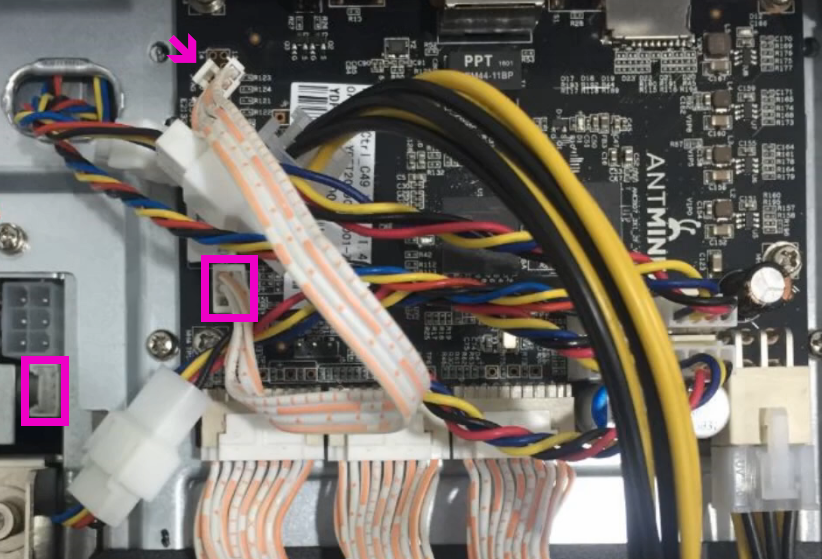
Make sure to check the small ribbon cable that goes to the PSU in newer miners.
ERROR: Socket is closed This issue happens during "Installation, Upgrade, Uninstallation" through the SSH connection.
The root cause can be a corrupted file in the /tmp/ file in the miner. A simple reboot can solve the issue.
I'm not receiving Braiins OS bonus rewards Set an older slushpool.com address if you're using a Braiins OS version older than 22.08.1 to successfully return the 2% of mining fee on Braiins Pool. Old addresses will work indefinitely.
Set new braiins.com addresses otherwise.
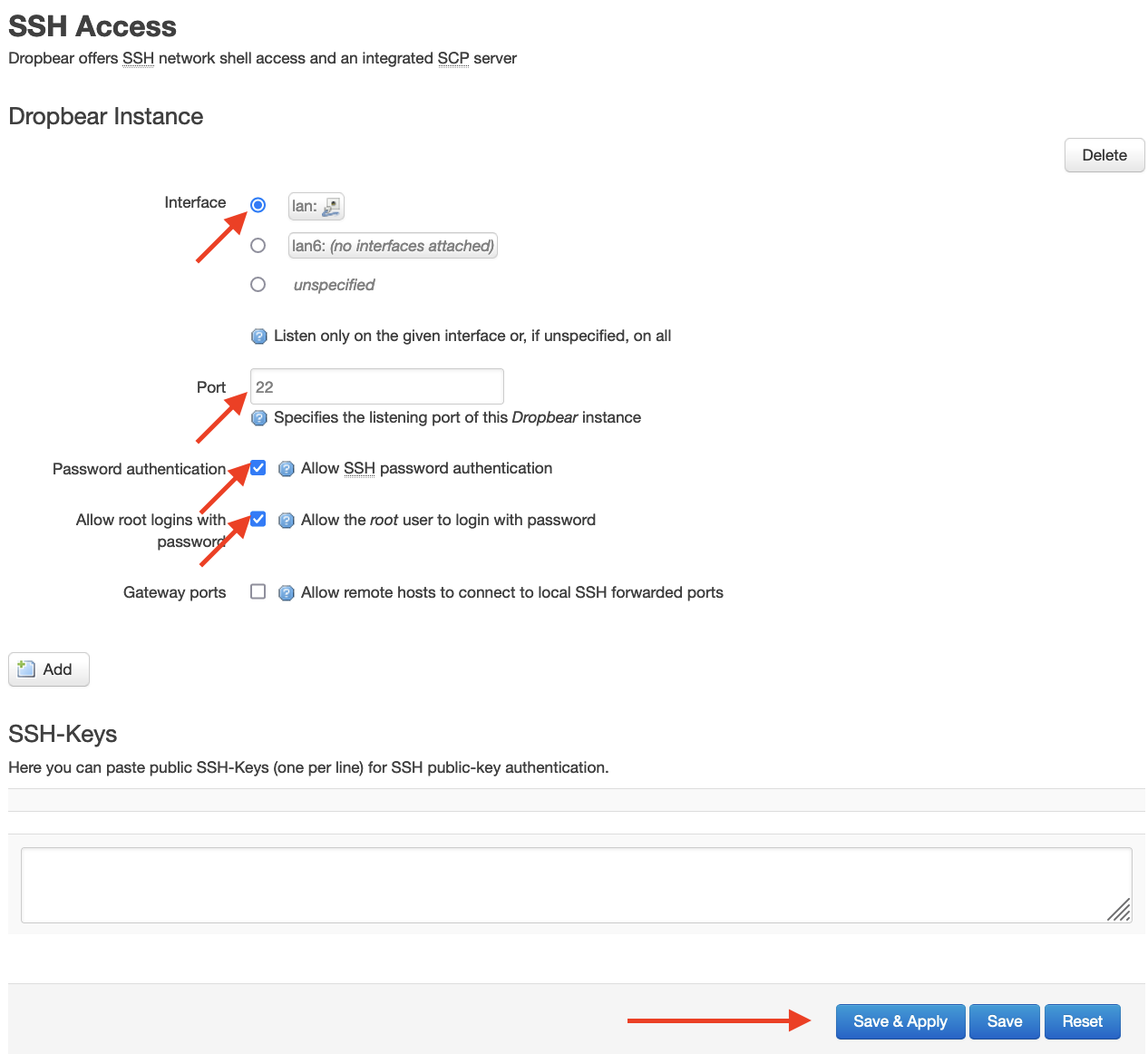
SSH connection does not work in Braiins OS Please navigate to top menu > System > Administration and make sure the settings are the same as the picture below:
I installed Braiins OS but still I see Bitmain firmware
- Please clear your web browser cache
- Please type just IP
- Try it on another browser.
- Make sure you are running off of NAND or SD Card appropriately.
All pools URLs are dead Please check these points:
- Make sure the pool settings are correct. (URLs, userName.workername) It can be a typo issue, such as an extra space or character.
- Make sure the pool is Asicboost supported.
- Please add more pool URLs, they are failover for each other. Recommended to add all V2 and V1 URLs
- Make sure the related ports 3333, 3336, and 3337 are not blocked in your network
- Ports can be different, based on which pool they are mining.
- In some cases DNS issues can cause a similar problem, so adding a custom DNS to your device network settings can do trick, navigate to top menu > Network > Interfaces > LAN > Edit:
- If you have DHCP Client protocol > Click on Advanced Settings > Uncheck the Use DNS servers advertised by peer and add a custom DNS like
8.8.8.8or1.1.1.1in the Use custom DNS servers field. - If you have Static address protocol > set the Use custom DNS servers by adding
8.8.8.8or1.1.1.1in the field. Keep in mind after these changes Restart BOSminer from the top-right menu > Quick Action > Restart BOSminer
Configuration page doesn't load/save correctly We identified a false/positive issue on some Antivirus and Internet Security software like Kaspersky Security Cloud.
If you see a message in top of the configuration page like:
Unknown Error / Saving Error[Network] Request has been forbidden by Antivirus
please disable your Antivirus temporarily or add your mining device's IP to its whitelist.
If you are using Braiins Manager this needs to be used to modify the configuration details.
Hashboard troubleshooting (Sensors showing 0 value / very low hashrate)
Please follow these steps:
- Please unplug the device from the Power unit and Network then Connect the device through a Ground wire to Electric discharge.
- Make sure your device is Ground connected.
- Try lowering the power limit value for Autotuning.
- A common choice is 1280W, even lower if needed.
- Try cleaning the boards. Sometimes dust causes this issue.
- Check the cables (power and data) are firmly connected.
- Try swapping those cables or replacing them.
- Try another Power Supply Unit.
- If the problem persists you can go to Miner > Configuration and disable the board until it's replaced.
- Sometimes just disabling the board for several hours, then enabling it brings it back. Disable the hashboard in Miner > Configuration > Override Global Hash Chains about 6 hours.
Check the hashrate and voltage, dying board, bumps voltage until it reaches ceiling, then gradually loses hashrate until it dies.
BTC Tools couldn't update pool URLs
- Make sure the device's password is correct in the BTC Tools setting.
- Make sure the device status is "success" in the list of miners.
- Make sure you typed
stratum2+tcp://orstratum+tcp://at the beginning of the URLs. - Make sure you typed the key for stratum V2 protocol:
9awtMD5KQgvRUh2yFbjVeT7b6hjipWcAsQHd6wEhgtDT9soosna - Make sure there is no
/at the end of URLs.
Correct URLs sample
Stratum V2
Stratum V1
Collect tcpdump logs for connection troubleshooting
SSH to the miner and run the commands below and let it run for at least 15 minutes.
Stratum V2
Stratum V1
Then you can use scp command or WinSCP software to download the collected log.
Next step: continue with the next FAQ "Run Stratum probe and collect logs for connection troubleshooting".
C5 or T9+ Control Board Logs with Braiins OS installed
The main error:
hread 'tokio-runtime-worker' panicked at 'BUG: hashchain instantiation failed: UIO device chain1-common: cannot find uio device
To fix this issue need to UNINSTALL Braiins OS from control board.
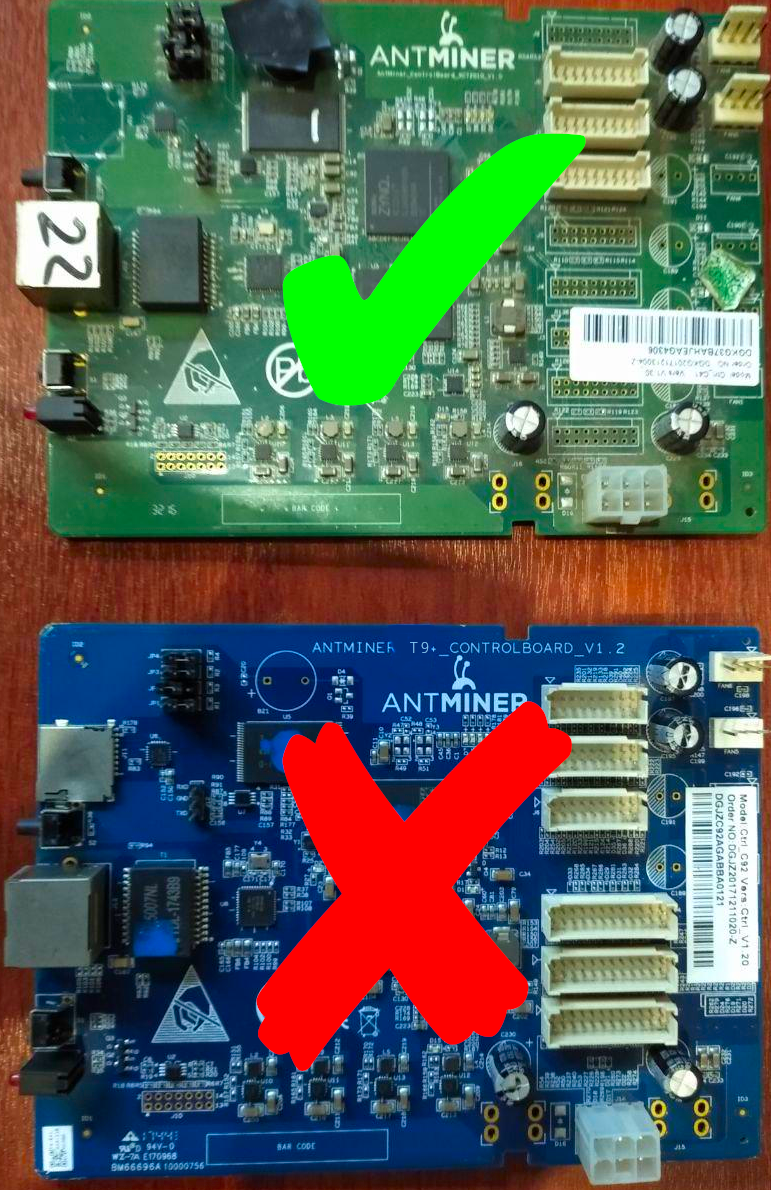
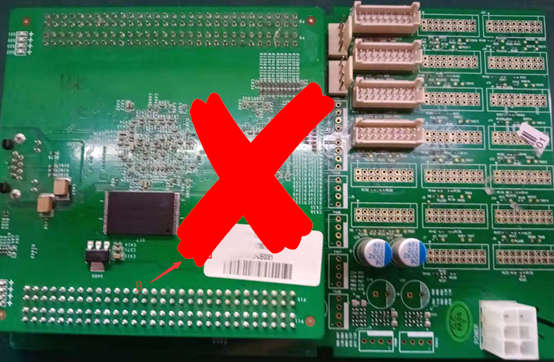
C5
Submit a support ticket
If your issue persists feel free to submit a support ticket.
For effective troubleshooting, include the following file to the ticket: Top Right Menu → Quick Action → Get Help → Download the zip file and attach to the ticket.