Understanding Braiins ID
Alice runs a small mining operation. Bob is her colleague. They want to work together without sharing passwords. Their story explains how your Braiins ID, the accounts you can access, and your security settings fit together.
Your Identity and Your Accounts
Your Braiins ID is your personal identity for signing in. It holds your email, display name, and the sign-in and security methods you have set up. An account holds your product data. You can own an account, or be invited into someone else's.
Alice owns Alice's Mining and Acme Mining. Bob owns Bob's Test Rig. After accepting Alice's invitation, Bob is also a Member of Acme Mining with Viewer access.
Each person signs in with their own Braiins ID. Bob's access to Acme Mining does not give him access to Alice's Mining, her password, or her security methods. Alice cannot access Bob's Test Rig just because they share Acme Mining.
Names are labels, not logins. Your identity has a display name and every account has an account name. Both exist only to help you tell things apart — Braiins ID has no usernames, and you always sign in with your email address. Alice can rename herself, or rename Acme Mining, without changing how anyone signs in, who is a member, or what they can do. Behind the names, your identity and each account also have a permanent ID that renaming never changes. Send it with any support request: Account actions → Account details shows both, with copy buttons.
How Alice Signs In and Recovers Access
Alice signs in with a method she has already set up, and Braiins ID asks for any extra verification that method needs.
Her security methods belong to her Braiins ID, not to a single account, so they protect every account she can reach. The Two-Factor Authentication page lists the methods she has turned on and the ones she can still add. She must add a second method before she can remove her last one, and she can generate new recovery keys there.
Password · Passkey · Google or Apple
Authenticator app · Security key
Or one unused recovery key, when offered.
- Code sent by email
- Required 2FA
- New password
The emailed code resets a password; it is not a 2FA recovery key and does not bypass required 2FA.
Braiins ID gives you five security tools. Each one has its own job.
Read the last column from top to bottom and you have the whole picture: get in, prove it is you, and get back in when you cannot.
One physical device can often act as both a passkey and a security key. Braiins ID still keeps them in separate settings, so set each one up where it belongs.
Keep your authenticator's setup key or QR code private. Anyone who has it can generate the same codes you do.
How Bob Joins Alice's Account
Alice invites Bob to Acme Mining using the email address for his Braiins ID. She keeps the Member account role and gives him Viewer access, so he can follow the account without placing bids. Until Bob accepts, the invitation is pending and does not grant account access.
- 01AliceSends an invitation
As owner, chooses Bob’s email, account role and access.
- 02PendingBob has no access yet
The invitation has an expiry date.
- 03BobSigns in and accepts
Uses the invited email and confirms the account, role and access.
- 04MemberBob can open Acme Mining
His account role and access now apply.
Bob opens the invitation link and signs in with the invited email. If he does not have a Braiins ID yet, he creates one, completes verification and security setup, and reopens the link. If he is signed in with another email, he switches identities. Forwarding the link does not invite another person.
Alice can revoke a pending invitation. To correct its email, account role, or access before acceptance, she revokes it and sends a new one. Once Bob has joined, she uses the member controls to change his account role or access.
Account Role and Access Apply to One Account
Every member has two settings in each account. The account role decides what they can manage in Braiins ID. The access level decides what they can do in the product.
Alice can also set Bob's access to No access: he stays a member of Acme Mining but cannot see or use it in Hashpower. See Members and invitations for the controls and screenshots.
What Changes Only Alice's View
Alice drags Acme Mining to the top of her Accounts list, so it is the one marked Opens after log in. She can also hide Alice's Mining from product account switchers. Both accounts stay on her Accounts page either way.
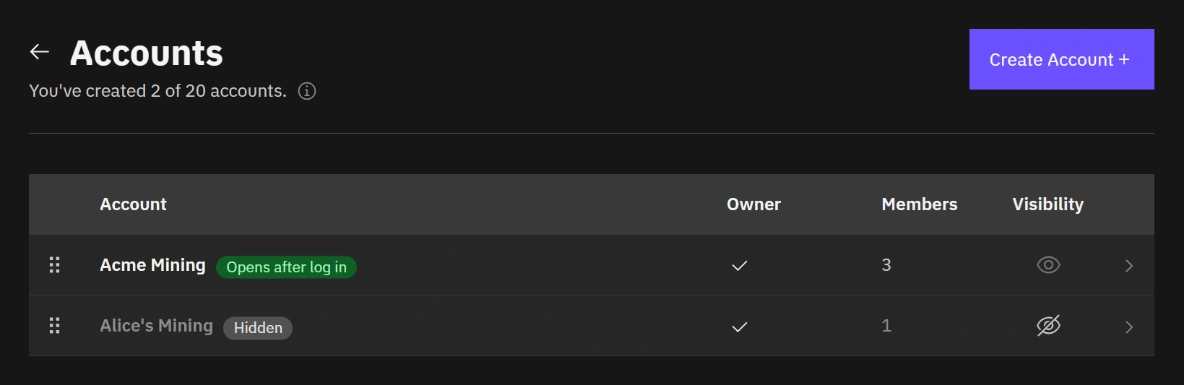
The order of the list and what is hidden are personal preferences. They do not change Bob's view, anyone's membership, or the accounts themselves.
If an account is missing from a product switcher, check whether you hid it. Also check that you are signed in with the right Braiins ID and still have access; hiding is only one possible cause. See Manage accounts and Troubleshooting.
Signing Out, Hiding, Leaving, and Removing
These actions affect different things. Signing out ends a browser session. Hiding changes a personal preference. Changing access keeps membership; leaving and removing end it.
Removing a member affects only that person's membership and access. Alice can leave Acme Mining only while another owner remains. See Leave an account.
Closing an account and closing your Braiins ID both go through support, because the accounts, memberships, and balances involved may need review. Open a support ticket and we will take it from there.
Coming later. Leaving an individual product, and closing your Braiins ID yourself, are planned but not available yet. Until then, support does both for you.
One Device Can Have Several Sessions
Alice can be signed in through Chrome and Firefox on the same laptop. Those are two separate Braiins ID log-ins. Ending one also ends its associated product sessions, while the other browser stays signed in. Log Out Everywhere ends both, including the browser Alice is using, and revokes connected-app access.
Active Sessions lists Braiins ID Log-Ins, Product Sessions, and Connected Apps separately. Alice can end one product session without ending her Braiins ID log-in. Revoking one app authorization does not log out her browsers.
She can inspect Profile, sessions, and connected apps and Activity for the sessions and events she is allowed to view. For a quick reference to all the terms used here, see Terms & Definitions.